A monitor mix is not built the way a house mix is. Out front you look for overall balance; on stage each musician needs to hear three or four very specific things, and everything else only gets in the way. This is the most widespread misunderstanding among engineers starting out in monitors: sending the band a scaled-down version of the FOH mix, when what they need is something else entirely.
- A good monitor contains almost nothing: the musician themselves, their timing reference, and enough to stay inside the song.
- Build every mix from silence, never by copying the house mix.
- The first source to raise is the one the musician needs to lock in with, not the one they play.
- Overall stage volume is managed by subtraction: adding level to cover a problem always makes it worse.
Start from silence, never from the house mix
The method that works fits in one sentence: open the auxiliary bus to its nominal level, all sends at zero, and raise only what is missing. It takes longer than copying the main mix, and it is the only way to get a readable wedge. Every source you add eats gain before feedback and masks the others: a wedge containing twelve sources is a wedge in which nothing can be heard.
The function that makes this bearable is sends on fader on digital consoles: select a musician’s mix and the channel faders show the send levels into that mix. Building a monitor becomes real mixing instead of twisting twenty-four small pots. On an analogue console the reasoning is identical with the aux pots, described in our guide to auxiliaries on an audio mixing console.

What each position actually asks for
There is no universal recipe, but there are constants. A musician needs themselves, a timing reference and a harmonic reference. Everything else is comfort, and one player’s comfort quickly becomes another’s masking.
Two cases deserve detail because they come up on every stage. The singer needs their voice, clearly above everything else, plus an instrument that gives them pitch — keys, an acoustic guitar. Sending them the whole drum kit does not help them sing in tune; it just makes them push. The drummer often asks for “more drums”: in reality they hear their own kit perfectly well acoustically, and what is missing is the bass, the only source that can give them both rhythmic and harmonic footing.
The build sequence
The following order works whatever the style and whatever the gear. Open the bus at nominal, all sends closed. Raise the musician’s main source until it is comfortable — for them, where they stand, not for you at the mix position. Add the timing reference just below that level. Add the harmonic reference a little lower again. And stop there: if the musician asks for something else afterwards, you will know exactly what you are adding and what it costs.
The move that separates good settings from bad is subtraction. When a musician says they cannot hear their voice, the natural reflex is to raise their voice; the effective one is to lower what is masking it. Raising always ends in the volume race, where the whole stage climbs towards feedback and nobody hears anything.
A stage that is too loud is never fixed by raising the monitors. Look first for what is producing the acoustic level: a guitar amp aimed at the room rather than at its owner, an undamped drum kit, wedges pointing into neighbouring microphones. One intervention at the source is worth ten decibels gained across every mix at once — and hands headroom back to everybody.
Mixing with few buses
Most stages do not offer one mix per musician. With four auxiliaries for five people you have to group — and grouping goes by need, not by geography. Two backing vocalists standing side by side share a mix happily; a singer and a guitarist standing next to each other almost never do, because their priorities differ.
The rule that limits the damage: put together the people who share the same main source. Two guitarists who need each other and the lead vocal coexist very well. A drummer and a singer never do — one wants bass and no vocal, the other the exact opposite.
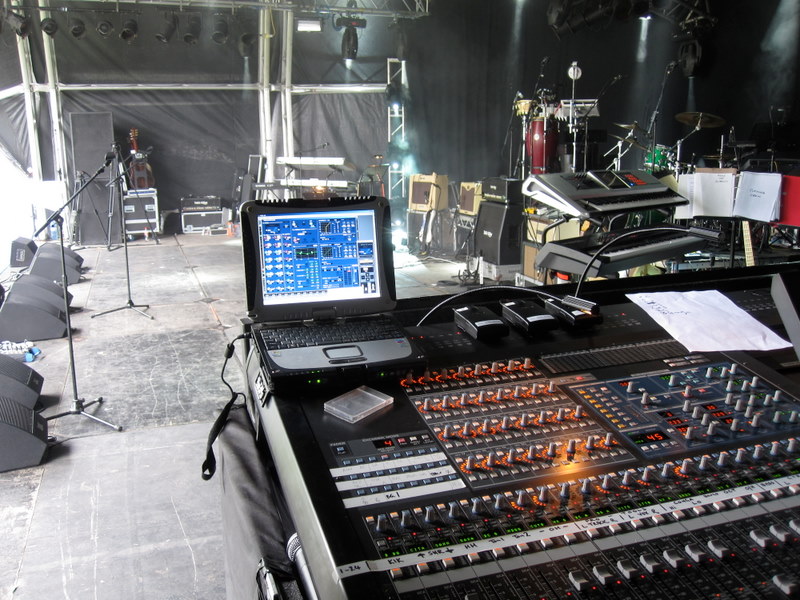
The best monitor tool is not on the console: it is going up on stage and listening, standing where the musician stands, while somebody plays. What you hear at the mix position bears no relation to what they hear half a metre from a wedge and two metres from a guitar amp. Two minutes on stage beat half an hour of blind back-and-forth. It is also the only way to understand why they are asking for something that sounds absurd from where you are.
During the show
A monitor mix is set at soundcheck and moves little afterwards — that is a sign of health. Adjustments during the set should stay small and slow: a musician signalling you wants one or two decibels, not a change of balance. On a scene-based console, keep track of whether recalls carry bus levels, or your work will be wiped at the next song.
That leaves headroom: a wedge that rings or overloads has a correction and gain problem, not a mixing one. And if the stage is so crowded with wedges that nothing more can be won, the real answer may lie elsewhere — our article on when in-ear monitors make sense weighs it up.
Frequently asked questions
Should drums go into the monitors?
As little as possible. Drums are already the most acoustically present source on stage; sending them back into the wedges burns headroom for nothing. The only useful exceptions are kick drum for a bass player or a singer, and an electronic kit, which produces nothing acoustically.
How many sources belong in one monitor?
Three or four. Beyond that, readability collapses and gain before feedback goes with it. If a musician asks for more, it usually means one dominant source is masking the rest — subtract, do not add.
How do I handle a musician who always wants more?
By lowering something else rather than raising what they ask for. Nine times out of ten what they want is already present but masked. And if overall stage level is the cause, no console setting will solve it.
Should the monitor mix resemble the house mix?
No, and that is the founding misconception. The house mix seeks overall balance for a seated listener; the monitor mix gives one specific musician the references they need to play. They share neither proportions nor sources.