Waves has overhauled one of the quietest yet most useful tools in the modern control booth. Tracks Live 2.0 is a full rework of its multitrack capture software for live sound: record a show off to the side, replay the session as a virtual soundcheck the next day, then export the whole thing to a DAW for mixing. Version 2.0 pushes up to 128 tracks, opens up to any Core Audio or ASIO interface, and syncs deeply with the eMotion LV1 ecosystem. Price: $49.
Capture the show, then replay it as if it were live
The idea behind a stage recorder is easy to state and harder to sustain across a festival day: cleanly grab every console input, with no clicks or dropouts, for hours. Tracks Live 2.0 captures up to 128 channels at once and then acts as the playback source for a virtual soundcheck: you feed the recorded tracks back into the console, at the same inputs, and dial in your mix on a real show while the room is empty. For a FOH engineer inheriting a band they never rehearsed with, that is the difference between discovering the act on song one and walking in with a balance already roughed out.
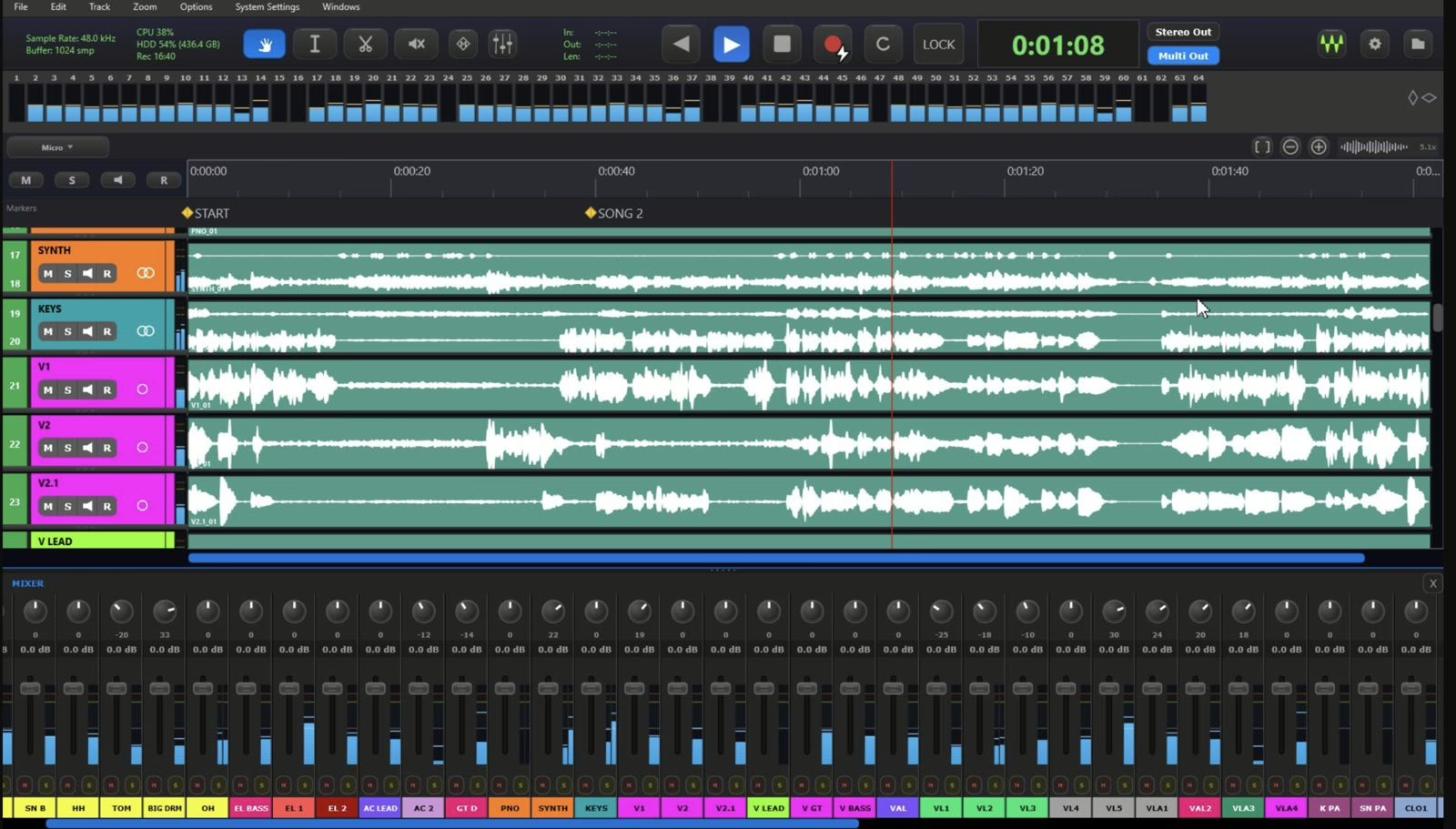
The real headline is how fluid this capture/replay loop has become. LV1 scene changes drop automatically onto the timeline as markers: you can see at a glance where the set shifted, which matters on a multi-band night or a one-off you cannot redo.
LV1 sync does the heavy lifting
This is where 2.0 scores the most. On an eMotion LV1 system, a single Sync button imports the entire routing: patched channels, track names, mono/stereo assignments and even channel colors. The tedious part of prepping a multitrack session — naming 64 tracks by hand, checking the patch one by one — all but disappears. Anyone who has thrown together a capture rig between two soundchecks knows what those ten minutes are worth.
Outside LV1, Tracks Live 2.0 still runs with any Core Audio or ASIO interface: plug in a MADI, Dante or multichannel USB card and record. Automatic patch sync stays a Waves-house feature, which is fair enough.
After the show: light editing and a DAW handoff
Once the show is captured, the software does not stop at a folder of WAV files. It allows simple fixes — trim a head, line up an intro, bounce a quick mix — then exports the session as a DAW project to continue in the studio. The bridge between live capture and production is explicit: record in the field, finish in peace. Plenty of engineers used to hack this together with a hastily built Reaper session; having it baked cleanly into the stage tool is a genuine quality-of-life win.
The essentials
- 128 tracks of simultaneous capture, macOS (Apple Silicon included) and Windows.
- Virtual soundcheck with replay to the console and automatic scene markers.
- One-click LV1 sync: patch, names, mono/stereo and colors imported in one go.
- Core Audio / ASIO compatible outside the Waves ecosystem.
- DAW project export for mixing and post. Price: $49.
Who is it for? Rental companies and touring engineers who want a reliable capture without lugging a second, badly configured laptop, and anyone running an LV1 who used to waste time rebuilding their patch. The virtual soundcheck is no gimmick: it is the tool that lets you prep a mix when you never get to rehearse with the band. For more on stage capture, see our guides to multitrack recording on the X32 / M32 and on the XR18 / MR18, plus our primer on audio over IP for carrying those channels, and on shaping a surface with groups and VCAs. Product page on the Waves site.
My take
At $49, Waves turns a touring chore into a reflex. The virtual soundcheck is nothing new, but having it in software that pulls an entire LV1 patch in one click is exactly the kind of detail that saves a soundcheck. The 128 tracks cover plenty, the DAW export closes the stage-to-studio loop cleanly, and the price is almost an afterthought next to the time saved on a festival night. The trade-off is plain: the sync magic really sings inside the Waves ecosystem. Outside LV1 the tool is still good, but it becomes one multitrack recorder among many. If you mix on LV1, this is a no-brainer.