Baby Audio loves tools that invite the happy accident. HyperWarp is no exception: it’s a granular and time-shifting effect that takes any source — audio or instrument — and chops it into tiny grains you rearrange by hand. Depending on the setting, the result runs from subtle vibrato to full-on broken glitch, with the ease of use that’s become the developer’s signature.
A granular engine driven by a graph
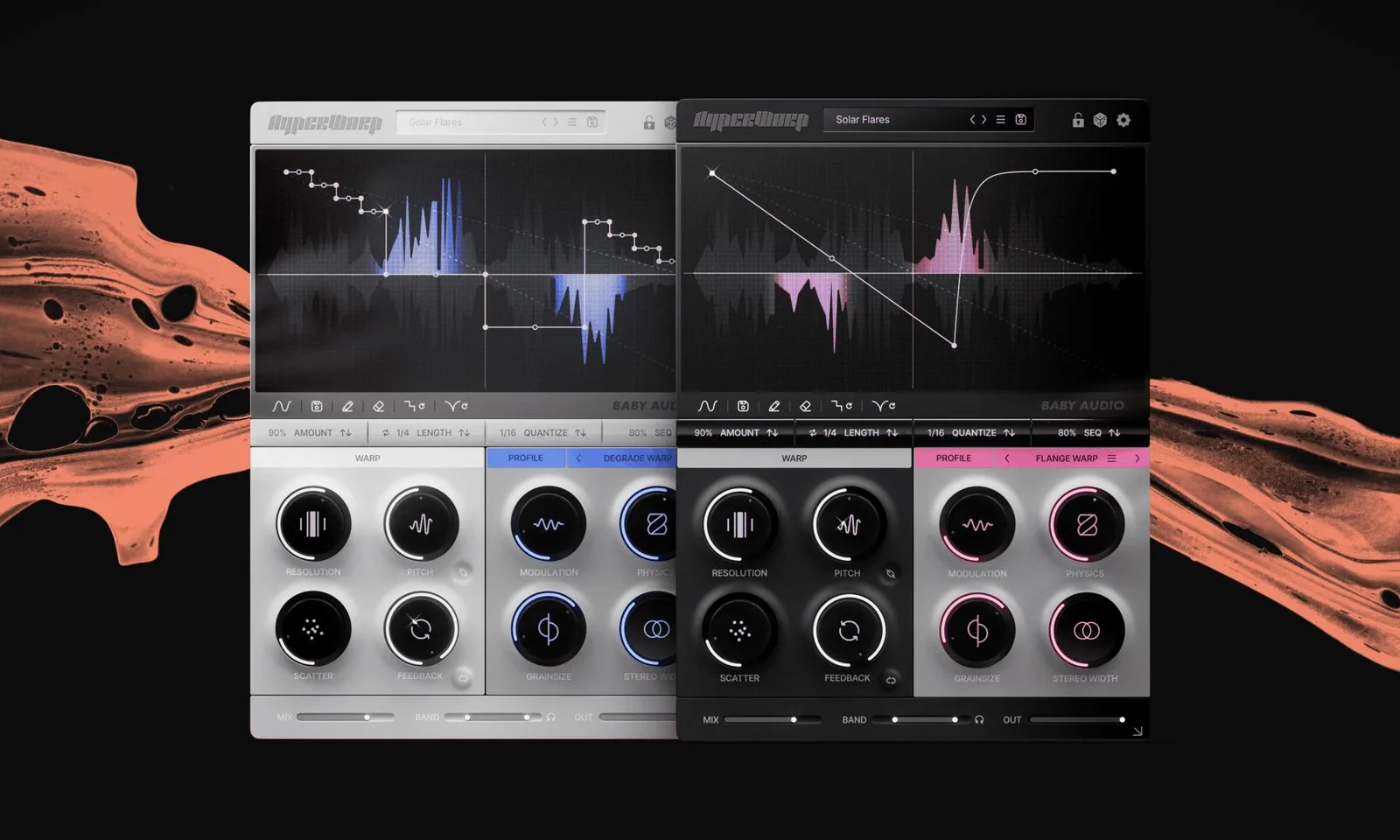
You insert HyperWarp on a channel, and the plugin reduces the incoming signal to grains you reorganise via a vector-grid editor. It all plays out on an XY graph: the X axis shows the position of the unaffected signal, while the Y axis talks to the engine, telling it how far back to go over the already-captured signal. As you load presets or draw shapes along the timeline, you change the way the chosen algorithm interacts with the audio — and that’s where the most unexpected textures come from.
Seven warp modes, each with its own macros
The heart of HyperWarp is its seven granular processing modes, each with four dedicated macro controls:
- Clean Warp: temporal processing, with vibrato and circuit-bending controls.
- Flange Warp: a deeper dive into the modulation and stereo image.
- Degrade Warp: filtering plus a Chaos control all its own.
- Filter Spam: per-grain filtering.
- Harmo-Nicer: a harmonic granular pitch-shifter.
- Fauxcoder: a resonance generator.
- Lo-Fizzly: a granular downsampler.
Resolution, Pitch and a loop that runs away
The two master warp controls are Resolution and Pitch, backed by a feedback loop that reprocesses the output through the engine to build complex, evolving delay effects. With 190 presets to start from and a near-infinite number of shapes to draw yourself on the graph, the playground is vast — while staying immediate, which is no small feat for a tool like this.
Price and availability
HyperWarp is available now, with a half-price launch deal — around $49 — until 30 November. After that, the plugin returns to its regular list price.
My take
Granular is often sold as a machine for drifting pads; HyperWarp points it at the rhythmic gesture and the glitch instead, which is refreshing. The XY graph that drives how far back you reach into the captured signal is a clever idea: it makes a normally abstract manipulation tangible, and the feedback loop opens the door to genuinely musical runaway. Seven modes is enough to cover subtle to destructive without getting lost. For a beatmaker or sound designer after hooks and fills with character, it’s the kind of tool you open ‘just to see’ and keep open for an hour.
Frequently asked questions
What does the XY graph actually do?
The X axis tracks the position of the unaffected signal; the Y axis tells the engine how far back to reach into the already-captured signal. By drawing shapes, you sculpt how the grains are replayed — the core of the effect’s behaviour.
How many modes and presets does HyperWarp offer?
Seven granular processing modes, each with four macros, and 190 starting presets, on top of the custom shapes you draw yourself on the graph.
Can I use it on an instrument as well as on audio?
Yes. HyperWarp inserts equally on an audio track or an instrument track in your DAW, and processes the source in real time.
What’s the feedback loop for?
It feeds the engine’s output back into its input, letting you build complex, evolving delay effects from a simple source.
Related reading: granular synthesis explained and Bitwig Studio 6.1’s granular and spectral Sampler.