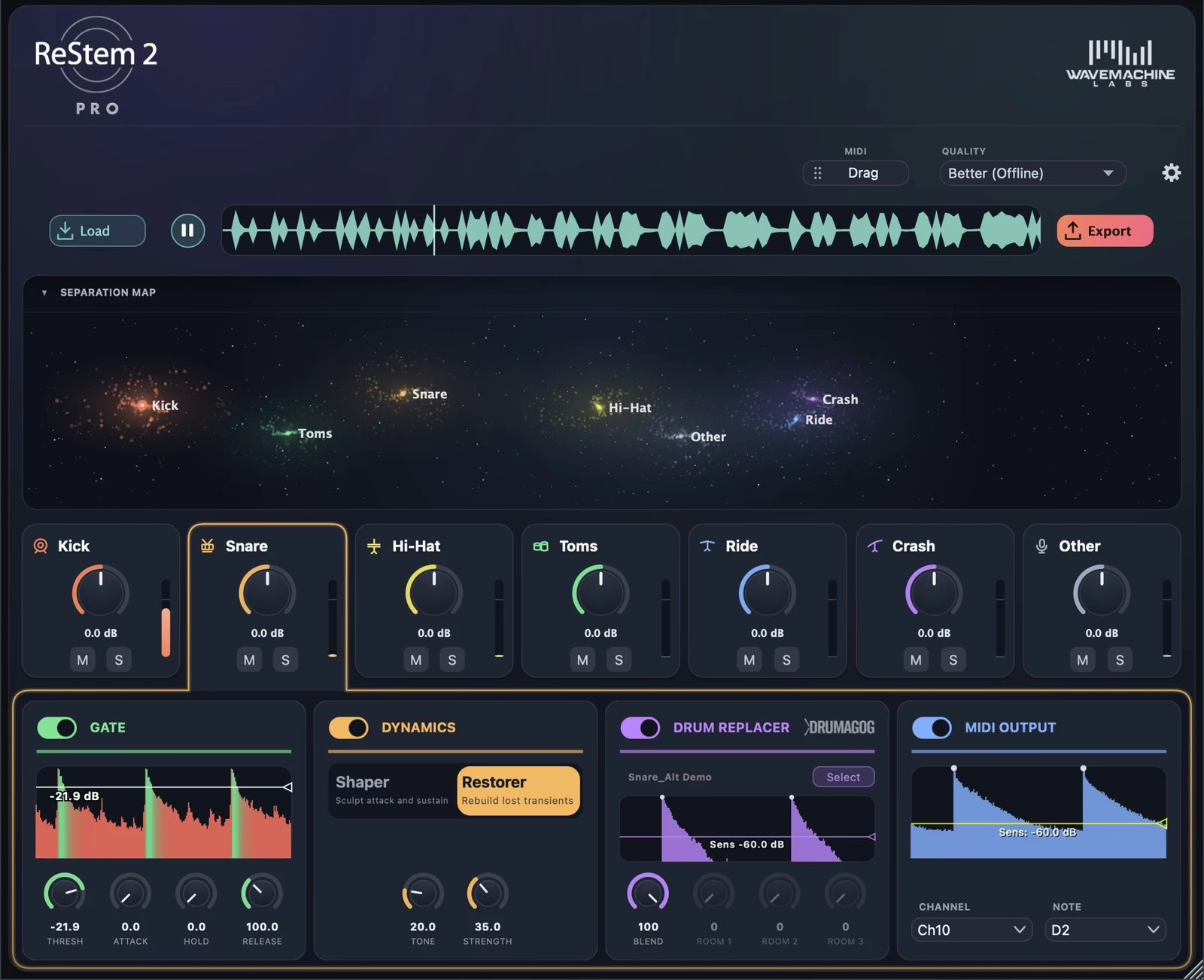
Not every drum take arrives with a full set of multitracks. Sometimes all you have is a stereo file: a room-mic capture, a rehearsal take, an old session that was already bounced, or a loop you bought years ago. That is exactly the ground ReStem 2 plays on — the new version of WaveMachine Labs’ drum-separation tool. Drop it on the track and the kit lands on individual faders: kick, snare, hi-hat, toms, ride, crash, and an “other” catch-all for the rest.
One thing is worth stating plainly: ReStem only works on drums, and nothing else. Where most separators treat the kit as a single instrument buried in a full mix, ReStem pours all its intelligence into shells and cymbals. That focus is what lets it pull seven genuinely usable stems from one stereo track, rather than an approximate mush.
Three modes, from realtime to the cleanest render
The headline of version 2 is a realtime separation mode. The first release did not separate live at all — the developer admits trying, then dropping it for want of quality. The new engine, rebuilt from scratch, changes that with three levels to choose from. Good separates the kit live, on the insert, as the track plays: the quickest way to work. Better renders the file offline for a cleaner result, now twice as fast as on ReStem 1. Best aims for the highest quality and holds up most on messy takes loaded with bleed from other instruments.
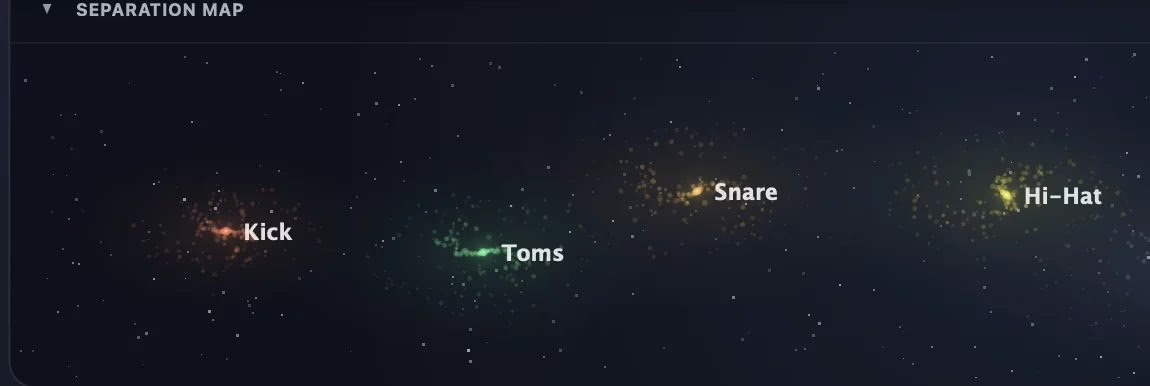
As the track plays, a Separation Map shows each drum as a cluster of stars that light up on every hit: deeper drums sit to the left, harder hits climb higher, wider sounds form broader clusters. Beyond the eye candy, it genuinely helps you see where each element sits in the mix.
A channel strip behind every drum
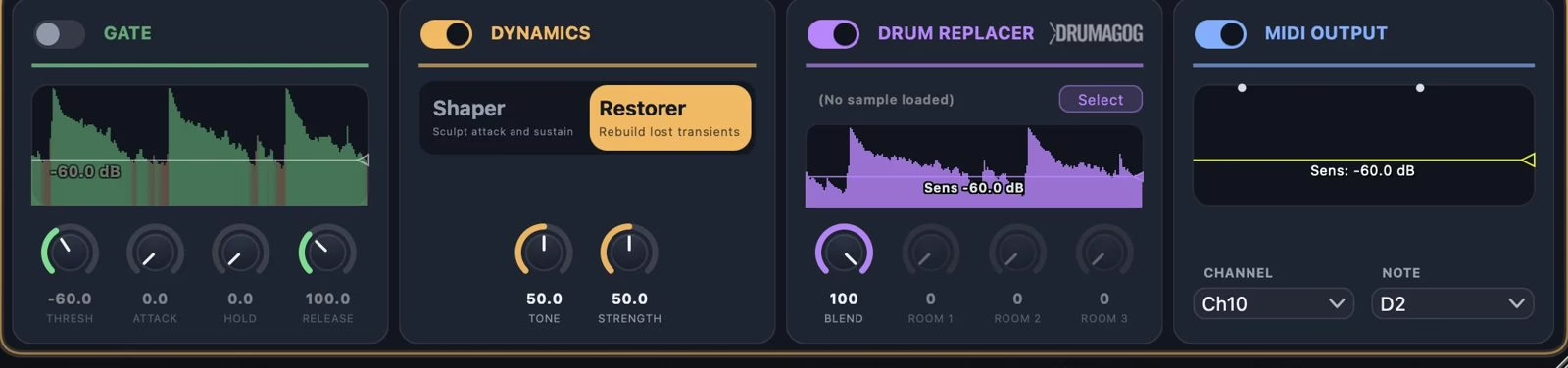
Once the kit is separated, each stem gets its own tools, with nothing to patch or route. A look-ahead noise gate cleans the bleed between hits, a dynamics stage tightens or loosens each drum, and on kick and snare a Transient Restorer — new in this version — rebuilds the attack that a stereo mixdown tends to round off. It is especially handy for rescuing a snare track that spills onto the hi-hat, or a live recording where the bass ends up all over the drum tracks.
Swap a drum, or trigger an instrument
WaveMachine Labs has made Drumagog, its drum-replacement tool, for more than twenty years. That engine is built straight into ReStem, on the kick and snare tracks: enable it and it swaps in a sample of your choice, lined up right on the original hit. Every stem can also send MIDI, driven by a new trigger engine called TrigNet, which keeps up with fast playing — blast beats, double kicks, ghost-note rolls. The Auto MIDI Notes feature even sorts toms by pitch and separates open, closed and pedal hi-hats, so your virtual instrument plays the right articulation with no setup.
On the timeline, and above all on your machine
If your DAW supports ARA, ReStem 2 reads the track the moment you add it: one press of Process and the stems appear, with no bounce and no separate recording pass. Elsewhere it runs as a normal insert, and a standalone app exists for working outside any sequencer. Formats cover AU, VST3, VST, AAX, ARA2 and the standalone.
The point I keep coming back to is that everything is computed locally, on your own computer — via Metal acceleration on Apple Silicon and the GPU on Windows. Nothing ever goes to the cloud: processing works even with the network cable unplugged. And the engine is repeatable: the same file always returns exactly the same stems, down to the sample.
| ReStem 2 Core | ReStem 2 Pro | |
|---|---|---|
| Formats | Standalone app | AU, VST3, VST, AAX, ARA2 and standalone |
| Realtime separation | No (offline modes) | Yes, on the insert |
| Per-stem strip | Level, mute, solo, export | Gate, Transient Shaper and Restorer |
| Drumagog replacement | No | Kick and snare |
| MIDI output | No | On every stem |
| Announced price | $99 | $199 |
The right tool in the right place
I have long argued that a fully in-the-box workflow is entirely viable: what matters is the sonic result, never dogma. Source separation was a gimmick for years; over the last two, it has become a real production tool. What ReStem does is honest: it does not pretend to resurrect multitracks that never existed, it gives you the means to rebalance, de-clutter and repair a drum take you would otherwise have set aside. The refusal of the cloud and the sample-accurate repeatability are not details for anyone working on confidential projects, or who needs to reproduce the exact same render six months later.
Two editions split the range: Core at $99 for separation and export, Pro at $199 for every format, the realtime mode, the full rack, replacement and MIDI. A seven-day free trial unlocks the entire Pro feature set — a good excuse to run it on your worst drum take. To stay with recent processing tools, see our pieces on the Waves Atlas reverb and the Drawmer FC1 and OC1 compressors.
Frequently asked questions
What is the difference between Core and Pro?
Core ($99) is a standalone app that separates, rebalances and exports the seven stems with both offline modes. Pro ($199) adds every plugin format, realtime separation on the insert, the full effects rack, Drumagog replacement on kick and snare, and MIDI output on every stem.
Do you need an internet connection to use it?
No. All processing happens locally, on your machine’s GPU (Metal on Apple Silicon, GPU on Windows). No file is sent to a server: separation works even with no network.
Does ReStem fit into my DAW?
Yes, as AU, VST3, VST, AAX and ARA2, plus a standalone app. In an ARA-capable host, one press of Process brings up the stems with no bounce or recording pass; elsewhere it works as a normal insert.
Can you use it on anything other than drums?
No, and that is deliberate. ReStem is trained on drums alone; that specialisation is exactly what lets it cleanly separate seven elements where a general-purpose tool would fail.
Can it drive another drum instrument?
Yes. Every stem can send MIDI through the TrigNet engine, even on very fast playing. Auto MIDI Notes sorts toms by pitch and separates open, closed and pedal hi-hats, so the right articulation triggers on your virtual instrument.