After three years of development and a long public beta phase, Anukari is now officially released. This software synthesizer does not emulate analogue circuits or wavetable oscillators: it makes simulated three‑dimensional mass‑spring structures resonate, calculated in real time on your graphics card. It is one of the most distinctive approaches to sound synthesis seen in a long time.
A synth that simulates physics, not electronics
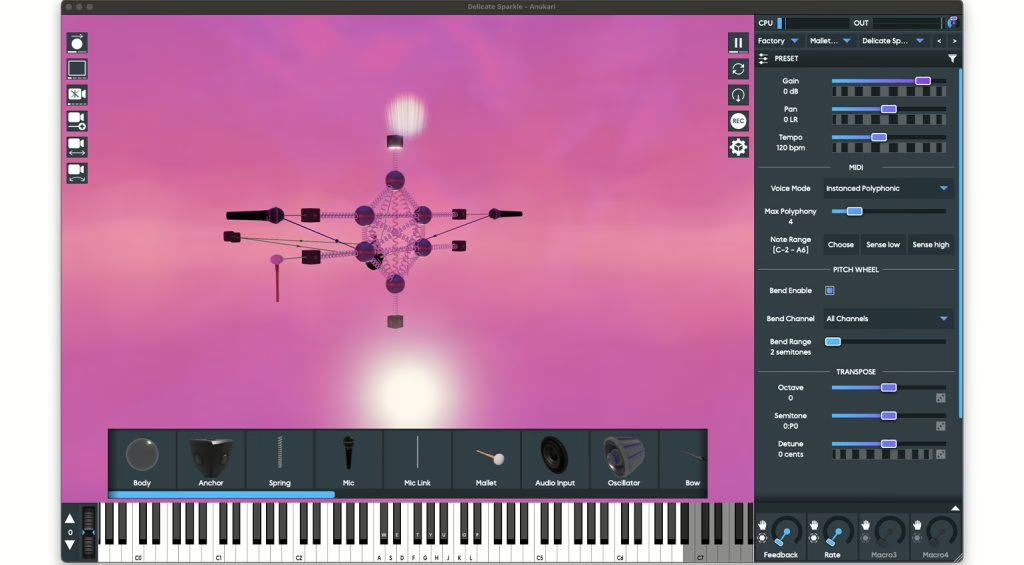
Physical modelling is not new: it has been around since the 1990s, from the Yamaha VL1 to the string and reed engines in modern computer music. But it has remained a strangely underused territory, often locked inside fixed presets that you tweak without ever really seeing what is happening under the bonnet. Anukari, created by developer Evan Mezeske, turns the problem on its head: you don’t choose an instrument model, you build it by placing masses in a 3D space and linking them with springs, before exciting them and letting them vibrate.
The result is part luthier’s workshop, part video game. You see your structure oscillate, twist, bounce and go into resonance as you play, and every change in tension, damping or mass is heard immediately. It’s this real‑time visual and sonic feedback loop that makes all the difference compared with traditional physical‑modelling synths.

Masses, springs and GPU power
The core of Anukari is a physics simulation that works on the same principle as a game engine, but clocked at the audio sample rate. In practice, the engine continuously solves the behaviour of several hundred interconnected masses, which represents a substantial computational load. The clever bit is offloading this to the graphics processor rather than the CPU: thanks to massive parallelism, the GPU can handle these dense networks while using only a fraction of its resources, so you can stack multiple instances in a single project.
To set your structures in motion, you have a palette of components that you connect to the masses:
- Mallets and bows for striking or bowing, like a percussion instrument or a bowed string;
- Exciters that inject energy continuously and sustain the vibration;
- Virtual microphones that you place within the structure to capture the sound where it is most interesting;
- Audio input, which lets you use Anukari as an effects processor and make an external signal vibrate through the simulation.
Genuine modulation depth
The risk with such a conceptual instrument would be for it to remain a curiosity. Anukari avoids this pitfall by grafting onto its physics engine a modulation arsenal worthy of a serious synth: sample‑accurate LFOs that can go right up into audio rates for FM‑style effects, MIDI‑triggered envelopes, envelope followers, and a modulation matrix whose connections are displayed physically in the 3D space. Almost every parameter can be modulated, and the whole thing supports MPE as well as microtuning via MTS‑ESP. It is far from a gimmick: it is an instrument you can play expressively and tune very precisely.
In terms of integration, Anukari behaves like any modern plug‑in, with one extra requirement: it needs a graphics card. That detail matters if you work on a machine without a halfway‑decent dedicated GPU.
| Configuration | Windows | macOS |
|---|---|---|
| System | Windows 10+ (64‑bit) | macOS 12+ |
| Processor | 2015+ with AVX2 | Apple Silicon M1+ or Intel 2015+ (AVX2) |
| Graphics | Vulkan‑compatible GPU | Recent integrated or dedicated GPU |
| Formats | VST3, AAX, standalone | VST3, AU, AAX, standalone |
My take
I’ve watched from the inside as music production shifted from analogue to computer‑based, along with all the promises of physical modelling that never really took off, for lack of processing power and, above all, for lack of an interface that makes you want to explore. Anukari finally ticks both boxes. Hijacking the GPU to run an audio‑rate simulation is not a marketing soundbite: it’s precisely what makes a network of several hundred masses playable, where a CPU alone would simply keel over. And the 3D editor turns a discipline with a reputation for being dry into a playground.
I wouldn’t file it under everyday production tools — it’s not a workhorse you reach for when you need a straightforward pad or bass. It’s a sound‑design instrument, meant for creating textures you won’t get anywhere else. But it’s exactly the kind of proposition that justifies the existence of a purely in the box project: here, computing power doesn’t imitate an old circuit, it opens up a genuinely new sonic territory. For anyone who likes rolling up their sleeves and getting stuck in, it is well worth the installation time.

Availability and price
Anukari is available on Mac and PC in VST3, AU, AAX and standalone versions. The instrument ships with over 200 instrument and effect presets and around a hundred shape templates to kick‑start your own constructions. As it comes out of beta, it is offered at an introductory price significantly lower than its regular price; a trial version is available so you can get a feel for it before you commit. The official developer page details the system requirements.
If you’re interested in physical modelling and unconventional software instruments, also have a look at the resurrection of Music Mouse by Eventide, our hands‑on with Korg Collection 6 on the virtual‑synth side, and the hybrid synth UDO DMNO for the hardware angle.