The multiband compressor is an old, brutally effective tool — but a rigid one: it carves the signal into adjacent bands set by crossover filters, then compresses each slice. Parish Audio flips the problem on its head with Parametric Compressor, a plugin that ditches crossovers to place compression bands exactly where you need them — the way you drop the bells of a parametric EQ.
Free bands, not imposed slices
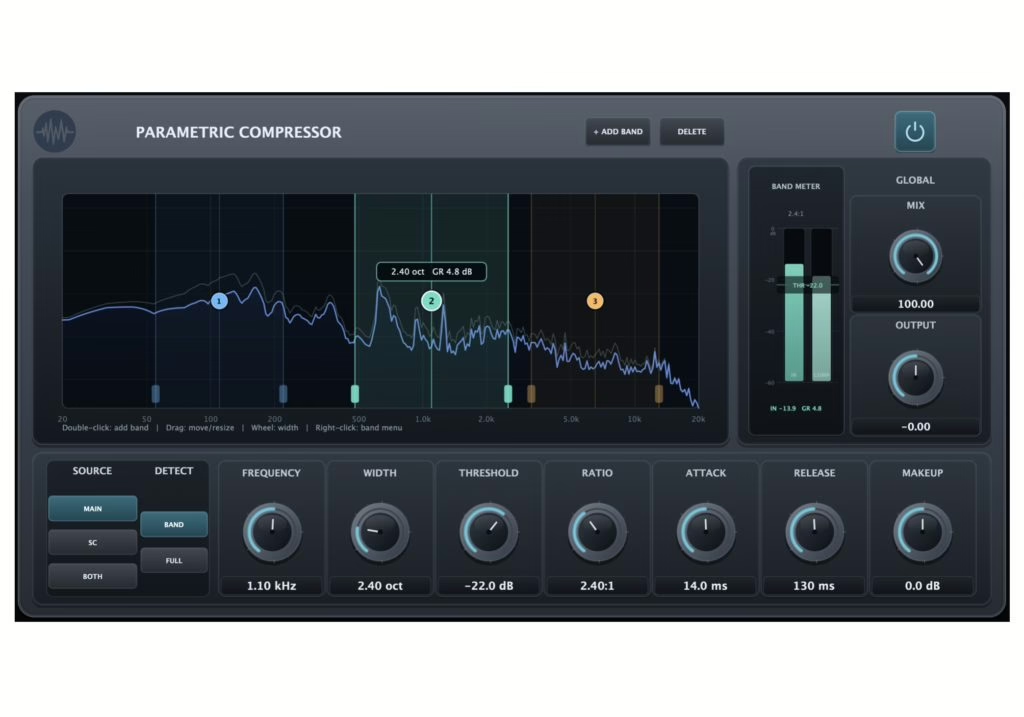
The difference comes down to one simple idea that changes everything in use. On a classic multiband, if you want to tame a vocal’s harsh 3 kHz, you inherit a band that spills into neighbouring frequencies and you have to live with the crossover points. Here, each band has two position controls — Frequency and Width — that define the treated region precisely. Make it narrow for surgical work, wide for a musical gesture, and let bands overlap freely, something a crossover forbids by design.
The plugin allows up to ten independent bands. Each has its own full dynamics chain: Threshold, Ratio, Attack, Release and Makeup. In other words, you don’t just pick a region of the spectrum — you also decide, region by region, how it behaves over time. That’s where Parametric Compressor stops being a plain multiband and edges toward a hybrid of dynamic EQ and precision compression.
Detection you can dial in
A compressor lives and dies by its detector, and Parish Audio paid attention here: the detection source can be the main signal, an external sidechain, or a blend of both. More importantly, detection can be band-limited or read the full spectrum. In plain terms: you can make a 200 Hz band react only to what happens in the lows, or have it follow the whole track’s energy for a more musical pump. That kind of toggle isn’t a given, even on pricey multiband units.
The interface centres on an interactive spectrum display: you create, select, move and resize bands directly with the mouse, with input and output spectra overlaid and gain-reduction feedback. That’s the right ergonomic instinct — seeing what you compress keeps you from overdoing it, a principle that also underpins gain structure in the digital domain.
Where it earns its keep
The use cases are obvious to the ear: taming a snare resonance without crushing the rest of the kit, holding a vocal’s sibilance with a narrow band up top (a de-esser that dares not speak its name), easing a congested low-mid on a guitar bus, or dynamically smoothing a mastering mix where a static EQ would let peaks through. On that last front, the tool plays nicely with an axis-based approach such as the Mid/Side processing we covered recently.
My take
We’re drowning in yet more 1176 and LA-2A clones, so when a small developer ships a genuine ergonomic idea instead of another emulation, I pay attention. Free-band parametric compression isn’t revolutionary in principle — dynamic EQ already flirts with this territory — but the “drop your band wherever you like, with its own envelope” execution is far more intuitive than juggling crossover points. The risk is the inverse of multiband: too much freedom invites stacking ten bands and over-processing. The discipline is the same as in the console days — fix an identified problem, not a whole spectrum “because you can”. Used sparingly, this is the kind of tool that quietly earns its place every day.
Price and availability
Parametric Compressor is available for Windows (VST3) and macOS (VST3 and AU). For launch, Parish Audio is running a 50% discount: $34.97 instead of $69.95, until 31 August. Given the approach, that entry price is worth at least a trial — and a reminder that a good interface idea can beat one more outboard emulation. For more on mastering dynamics, see our piece on the ONRI Audio REISEI processor.