On a serious shoot — documentary, drama, live capture, news — sound is almost never recorded in the camera. You use a double system: the camera films, a dedicated audio recorder captures sound with real preamps, real monitoring and mics placed up close. What remains is to reunite the two in post, picture on one side, sound on the other, perfectly aligned. All the difficulty — and all the craft — lies in that synchronization. Let’s see how it works, and how never to get it wrong.
Why record sound separately
The question always comes up: why make life harder? Because a camera’s onboard audio is, in the vast majority of cases, a stopgap — noisy preamps, aggressive limiters, limited inputs, rough monitoring. A dedicated recorder offers clean preamps, several tracks, real level control and the freedom to place the boom or the wireless exactly where needed. Sound gains clarity and headroom immediately. The trade-off: two separate files that must be brought together.
The real problem: clock drift
Camera and recorder each have their own internal clock. And no clock is perfect: two devices set to the same speed actually run very slightly differently. Over a few seconds, no one notices. Over ten or twenty minutes of a long take, the gap becomes audible: sound gradually pulls away from picture, lips and voice drift apart. This is drift, and it is what the whole timecode mechanism exists to tame. The topic is a cousin of word clock and jitter in the studio: in both cases, it is the stability of the time reference that guarantees cleanliness.
Timecode: a shared clock
Timecode (SMPTE) is a time counter expressed in hours:minutes:seconds:frames, stamped into each device. The idea is simple: if the camera and the recorder share exactly the same timecode, the editing software can align both files automatically, to the frame, simply by matching the counters. Timecode does not replace the sample clock; it provides a shared time label, a common address each medium carries in its metadata.
Two modes coexist. In free-run, timecode advances continuously, locked to time of day: ideal for multicam and documentary, since everything shot at 2:03 pm carries the same address, whatever the device. In rec-run, timecode only advances during recording: more compact, but less convenient once you have several sources.
Jam sync: putting everyone on the same time
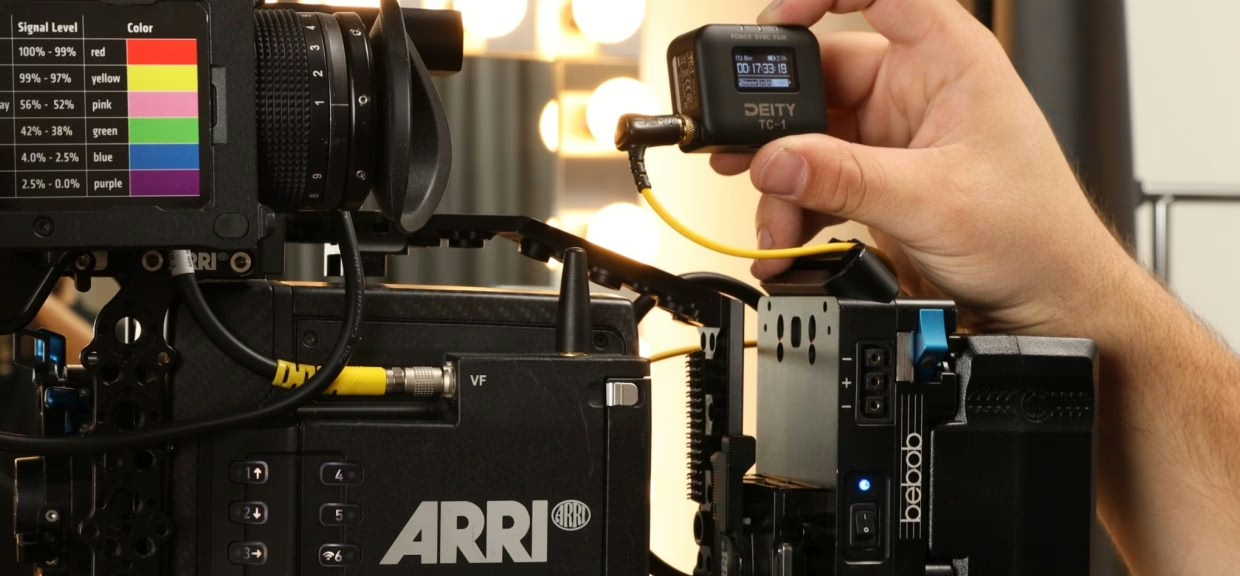
How do you guarantee that camera and recorder share the same timecode? Through jam sync. You take a master timecode source — often a small timecode generator like the Deity TC-1 or a Tentacle Sync — and “jam” its timecode into each device, one after another, over a cable. Each device then copies the value and keeps counting on its own, now aligned to the reference.
The key phrase is “on its own.” After the jam, the device follows its own clock: drift slowly resumes. Hence an unavoidable field rule: you re-jam regularly, typically every few hours, and always after a battery change or a power-down. The best generators claim accuracy on the order of a frame over several hours; camera internal clocks, far less. Skip the re-jam and you’ll find an offset in the edit when you thought you were covered.
What about the clapperboard?
The traditional slate hasn’t disappeared: it remains the ultimate safety net. The clapping arm provides a visual cue (the frame where the jaws close) and an audio cue (the sharp “clap” in the track) that are perfectly synchronous. Even when shooting with timecode, a clap at the head of a take offers a foolproof manual sync point if metadata is lost. Timecode slates combine both worlds: they display the master timecode on camera, readable straight off the picture.
Auto-sync in the edit
In post, several routes lead to alignment. The most reliable: timecode, when it was properly jammed — the software (Premiere, Resolve, Final Cut, Pro Tools) groups media by matching counters, hands-off. Failing that, waveform matching compares the camera’s reference audio to the recorder’s and lines them up: handy when there’s no timecode, but slower and sensitive to noise. Timecode stays superior as soon as you have several cameras or long takes.
One technical trap deserves attention: frame rate. Timecode 24, 25, 29.97, drop-frame or not: a mix of rates between camera and recorder, or a 29.97/30 confusion, produces a slow, insidious offset. Set the same rate everywhere, note it, and check it before rolling. It’s the kind of invisible detail that costs an evening in the edit.
Where this workflow meets the rest of the chain
Double system isn’t only a set matter. Its logic — record cleanly at the source, sync afterward — reappears in the double-ender of remote podcasting, where each participant records locally before a common realignment. And once sound is married to picture, it joins the classic broadcast chain: loudness compliance before airing, and possible transmission over a contribution codec back to the gallery. Timecode is only the first step of a chain that must stay coherent end to end.
My take
Double system looks scary on paper and becomes routine within three shoots. Timecode is no big-budget luxury: a pocket generator costs about as much as a good lavalier and kills the chore of manual realignment. The only discipline that matters is regular re-jamming — forget it and you’ll believe you’re covered while drift works in silence. Keep the clapperboard anyway: it’s the seatbelt that never runs out of battery. Well synced, clean sound changes everything; badly synced, the finest recordist in the world is worth nothing.