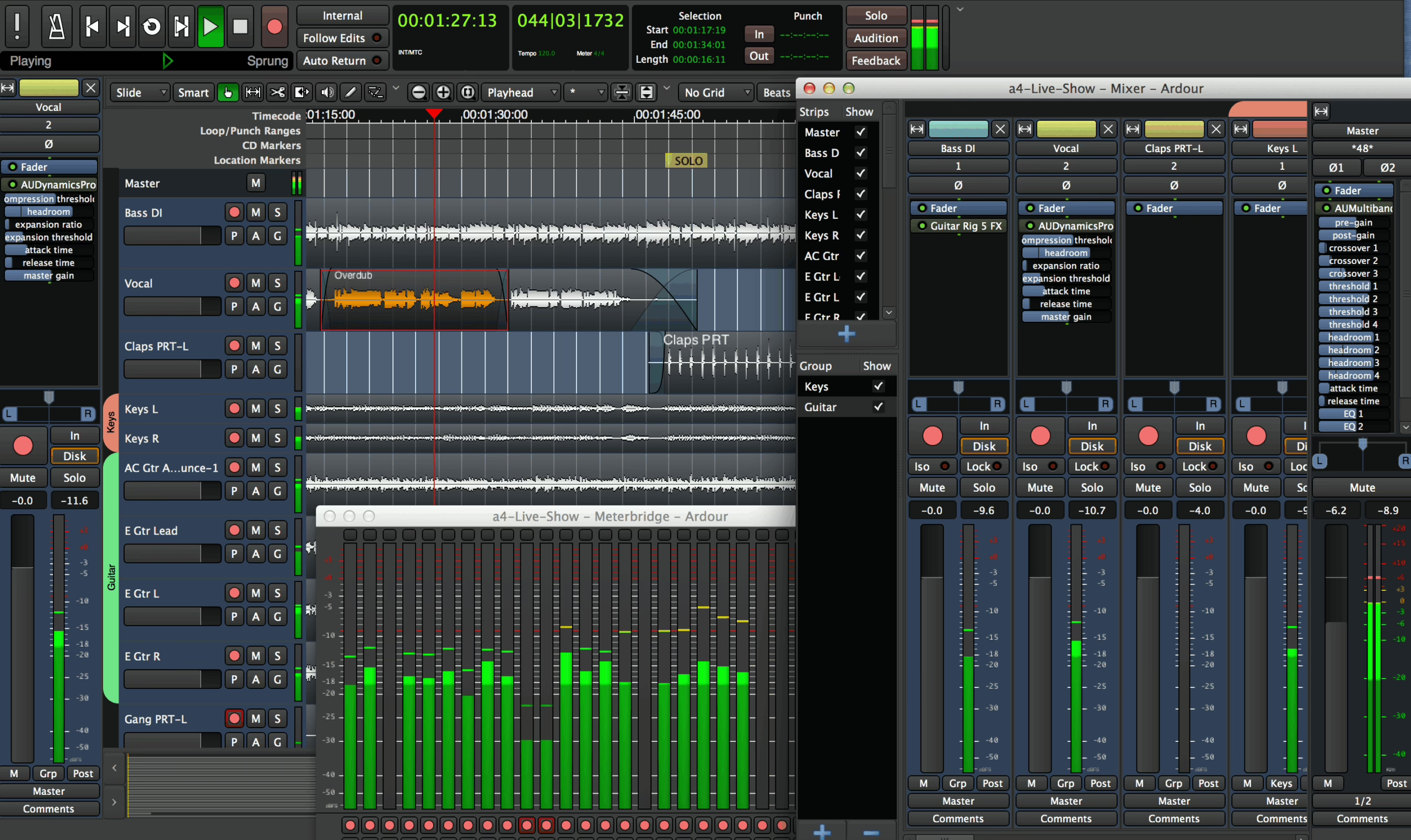
Ardour 9.0 isn’t just another update to a free, open‑source DAW. This release is a turning point: the long‑standing Linux studio workhorse is finally catching up with the standards of smoothness, speed and day‑to‑day comfort that users of Logic Pro, Cubase or Ableton Live have come to expect – while keeping its DNA as a serious production tool.
Who does Ardour 9.0 really change things for?
Before getting into the details, it’s worth placing Ardour 9.0 in the current DAW landscape:
- Up against Ableton Live: Ardour doesn’t clone Ableton’s Session workflow, but it does introduce clip‑based workflows and cue slots that are mature enough for loop‑based writing, quick sketching and performance.
- Up against Reaper: like Reaper, Ardour focuses on flexibility and a light footprint, but with a more explicitly “audio + MIDI studio” approach and an open‑source model.
- Up against Logic / Cubase: Ardour still ships with fewer built‑in instruments, but it’s clearly catching up in terms of editing quality, automation and arrangement comfort.
In other words: if you’re looking for a powerful, modern, cross‑platform DAW with no subscription and no proprietary lock‑in, Ardour 9.0 becomes a credible option in its own right – not just a free “plan B”.
Composing and arranging: MIDI finally up there with the major DAWs
The main criticism levelled at earlier versions of Ardour was often its MIDI: capable, but a bit rough round the edges. Ardour 9.0 tackles that weak spot head‑on.
A piano roll designed for music, not for tech
Ardour 9.0 significantly improves how MIDI editing fits into the DAW’s overall workflow.
The piano roll editors are no longer just technical pop‑up windows: they’re now genuine focused workspaces where notes, velocity and automation data remain readable and consistent with the main timeline. The aim is clear: make MIDI editing feel more like a musical sketchbook and less like a spreadsheet.
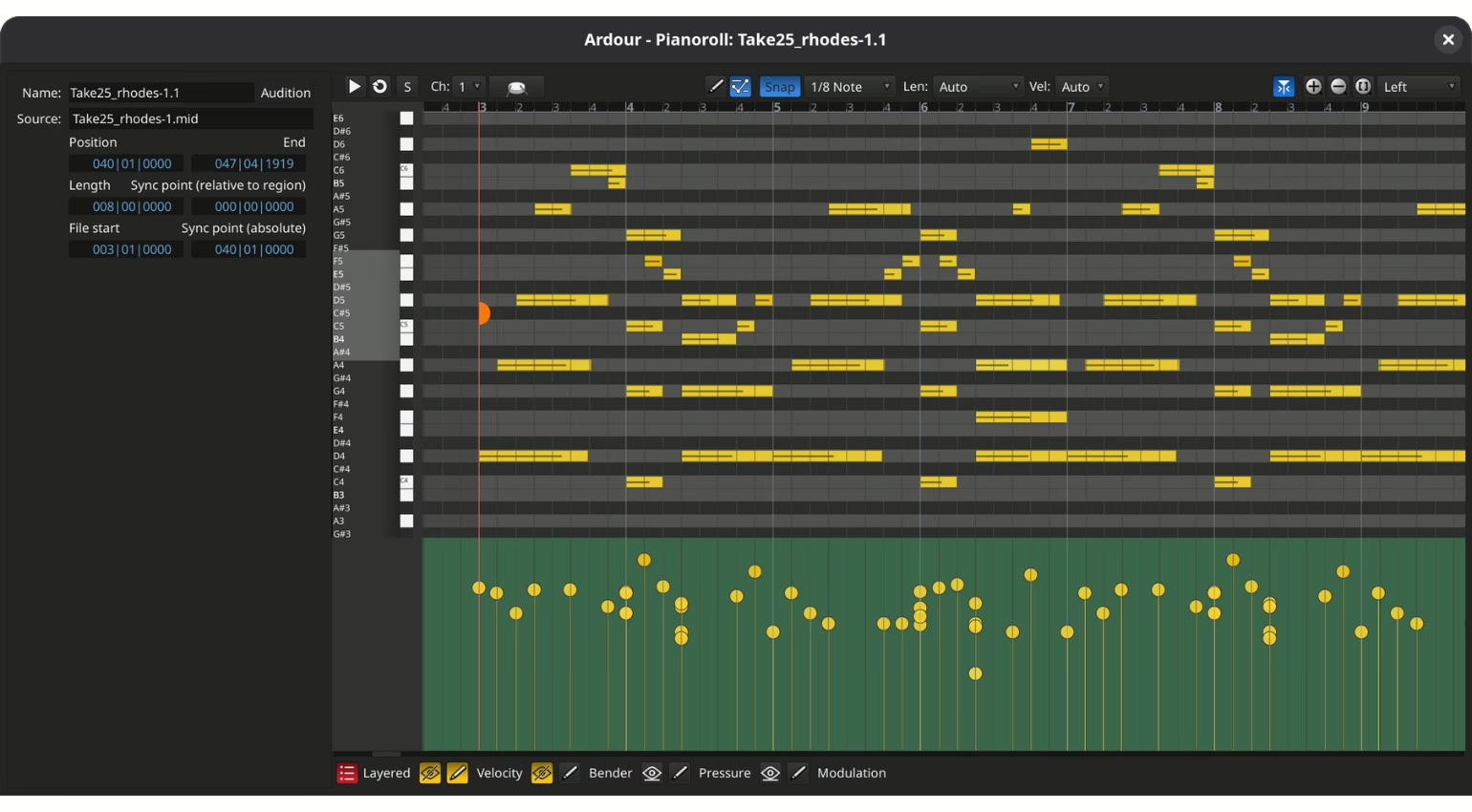
The way these editors behave stays in line with the main edit window: moving, selecting, shortcuts. The result is a much more natural transition from the fine detail of a MIDI bass line to the bigger picture of the arrangement, without breaking your flow.
Clip‑based writing: Ardour (finally) gets a proper performance mode
The other big change for writers and producers is in clip‑based workflows. Without trying to imitate the big clip‑launching DAWs note for note, Ardour 9.0 finally makes this way of working genuinely usable.
Headline additions:
- Record straight into cue slots: instead of putting ideas down on the timeline first, you can play and loop ideas immediately, whether they’re rhythmic patterns, pads or evolving sequences.
- Musical clip launching: clips fire on musically relevant points, keeping the timing tight and letting you quickly test several versions of a groove or arrangement.
Unlike some DAWs that pile on performance features as party tricks, Ardour 9.0 builds clips into its own production logic. You can start a sketch with loops, then move naturally over to a linear, “studio‑style” structure for finishing.
Sound design and mixing: a smarter DAW rather than one stuffed with gizmos
Ardour 9.0 doesn’t try to win the “bundled plugins” arms race; instead, it focuses on streamlining the core actions that waste time in every DAW once projects get big.
Region FX: turning audio editing into a sound design tool
The arrival of per‑region effects is one of the most significant changes. Where many DAWs still force you to duplicate tracks or stack up automation just to treat a single phrase with a delay, filter or modulation, Ardour 9.0 lets you apply these processes directly to the audio region.
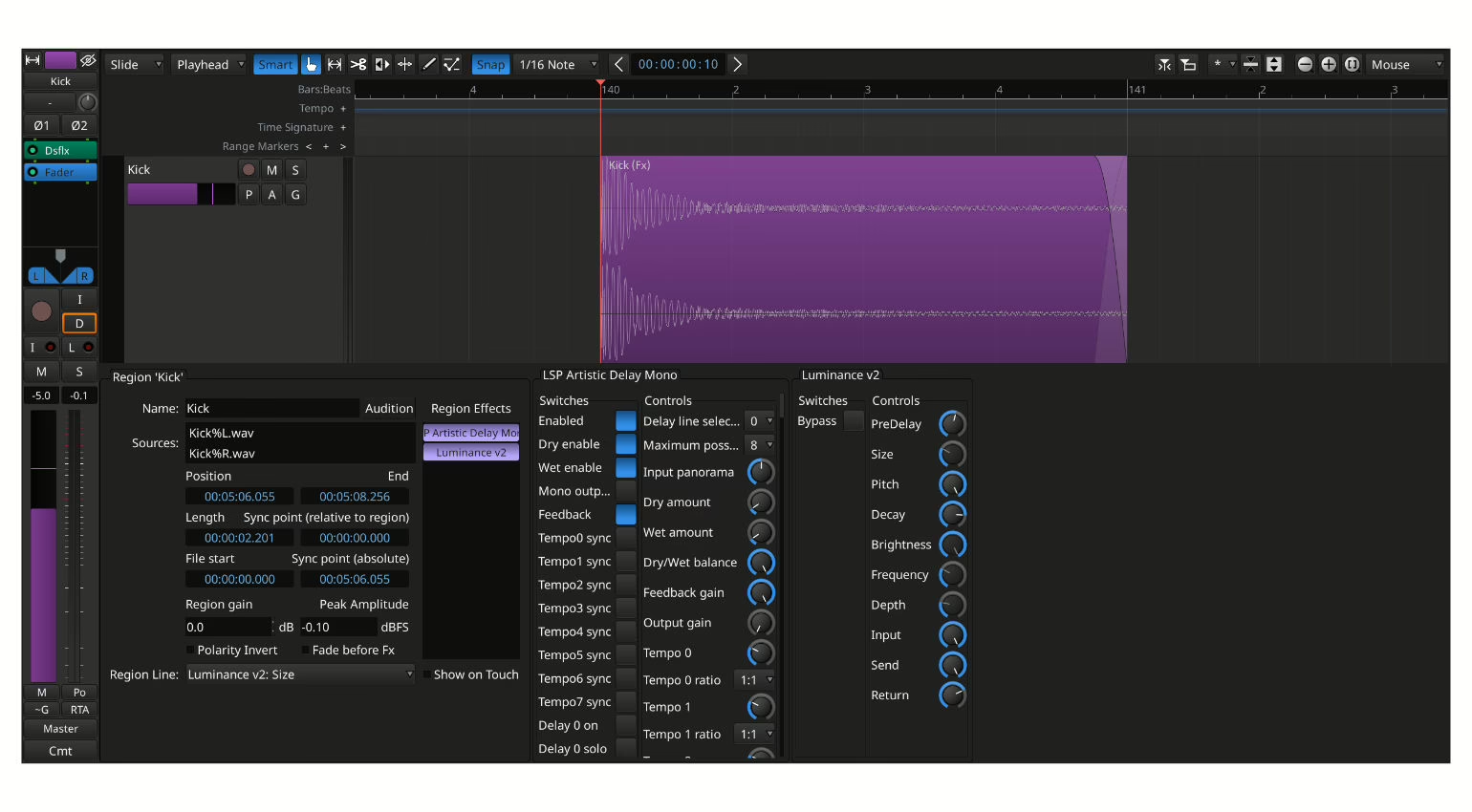
In practice, this brings:
- Cleaner sessions: fewer duplicated tracks, fewer aux buses created just for one throwaway effect.
- A leaner mixer: you keep a clear view of the important elements of the mix without being buried under “technical” channels.
- A more direct sound design workflow: effects follow the region when you move it around the arrangement, which is ideal for electronic productions, post‑production or narrative podcasts.
Because the processing runs offline, performance stays solid even when sessions get heavy with creative treatments. That’s crucial if you’re working on a modest machine or large, complex audio projects.
Perceptual analysis: seeing the mix the way you hear it
Another notable step forward is the new perceptual analyzer for spectrum visualisation. The idea is to show several signals in a single spectral view, so you can instantly see how elements in the mix overlap in frequency.
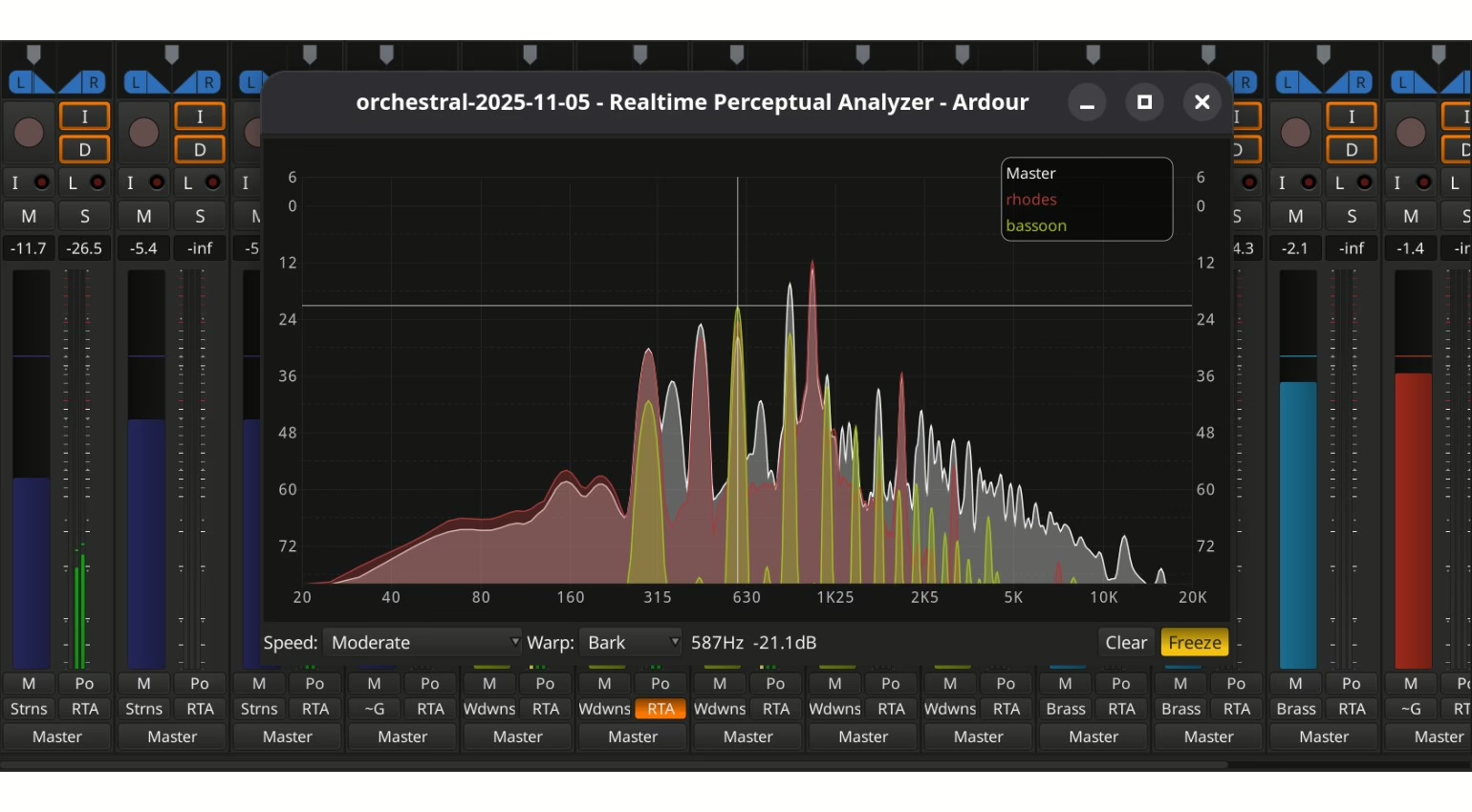
In practice, this brings Ardour closer to what high‑end, multi‑channel analyser plugins offer, but built directly into the DAW. It lets you:
- quickly spot frequency clashes between kick, bass and mid‑range elements;
- make mix decisions while you’re still writing, instead of postponing everything to the final stage;
- link automation to tonal balance more intuitively, especially with the new keyboard‑oriented automation editing, which speeds up dynamic tweaks dramatically.
Ergonomics: less friction, more music
Ardour 9.0 doesn’t reinvent the DAW concept, but it does polish a lot of everyday details that used to slow you down. The goal isn’t to dazzle visually, but to reduce friction at every step.
Interface performance and multitouch
On a practical level, the new version feels more responsive across all supported systems:
- macOS benefits from a smoother interface, which was an area where it lagged behind some native DAWs.
- Linux and Windows both get a comfort boost from multitouch support. On a modern touchscreen, editing becomes much more hands‑on: ideal for tightening up takes, shaping envelopes or riding faders.
This is a space where very few open‑source DAWs really venture. Ardour 9.0 closes some of the gap with commercial solutions designed around control surfaces and multi‑touch screens.
Import / export of mixer strips: taking template management up a notch
The ability to import and export mixer strips is another sign that the developers are targeting real studio workflows:
- You can now move entire processing chains from one session to another (EQ, compressor, saturation, routing, etc.).
- Engineers can build up banks of go‑to strips: lead vocal, drum bus, master bus and so on, much like with analogue consoles and recall systems.
This level of systematic re‑use brings Ardour closer to the professional DAWs widely used in broadcast and post‑production, while still being accessible to advanced home‑studio users.
Ardour 9.0 in a modern setup: where does it really sit?
Ardour 9.0 runs on Linux, macOS and Windows. The software is available as a free download from the developer’s website, in line with the open‑source model. In day‑to‑day use for musicians and engineers in the UK, it fits particularly well into three kinds of setup:
- Demanding home studio: if you’d rather put your budget into mics, preamps and monitors than into software licences, Ardour 9.0 now offers a modern enough foundation that you don’t feel like you’re compromising.
- Hybrid studio / live rig: with cue slots and clip‑based workflows, Ardour can handle both production and computer‑driven live performances, without forcing you to switch over to a dedicated live‑performance DAW.
- Linux or multi‑OS environment: Ardour remains one of the few truly cross‑platform, open‑source DAWs, making it an appealing hub if you work across several systems and don’t want to be locked into a closed ecosystem.
It won’t necessarily replace a flagship DAW in every commercial studio, but for many musicians, engineers and content creators who want a transparent, controllable and future‑proof environment, Ardour 9.0 becomes a serious contender.
FAQ: choosing Ardour 9.0 for your use case
Can Ardour 9.0 genuinely replace a commercial DAW in professional use?
Yes, if your priorities are audio/MIDI editing quality, flexible routing, open formats and stability. Ardour 9.0 still offers fewer built‑in virtual instruments and “ready‑made” presets than bundled suites like Logic or Ableton Live, but when it comes to the fundamentals of recording, editing and mixing, it’s now mature enough for professional use – as long as you’re happy to assemble your own plugin toolkit.
Is Ardour 9.0 suitable for loop‑based electronic composition?
Yes – far more than before. The clip‑based workflows, recording straight into cue slots and musical clip launching make loop‑based writing a realistic option for electronic music, hip‑hop or modern pop. If you live entirely in an “Ableton‑style live performance” world, Ardour won’t fully replace Live, but you can now compose and arrange using loops without feeling boxed in.
Is Ardour 9.0 suitable for tracking bands and full studio sessions?
Yes. Ardour was originally designed as a studio recorder/mixer, and version 9.0 absolutely builds on that heritage. The improvements in editing, Region FX and perceptual analysis actually strengthen its appeal for recording drums, bands and complex multitrack projects. For engineers used to consoles and linear workflows, it remains a logical fit.
What are the main trade‑offs with Ardour 9.0?
The main trade‑offs are: fewer built‑in instruments and content than in an “all‑in‑one” commercial DAW, an interface that can feel a bit more utilitarian than some mass‑market stations, and a learning curve that’s still on the technical side if you want to tap into all the routing power and customisation. In return, you get a free, open‑source, cross‑platform DAW, with very fine‑grained control over your workflow and a clear focus on real‑world production rather than marketing demos.