Ever since Steinberg shipped SpectraLayers 13, the same question keeps coming up in control rooms and bedroom studios alike: how far can we now pull apart a finished mix to recover the vocal, the bass or the drums on their own? Neural-network source separation has gone, in three short years, from a jaw-dropping party trick to a genuine everyday tool — for remixing, repair mastering, karaoke, clean sampling, or salvaging archive recordings that never had a multitrack.
I lived the shift from analogue to computer-based music production from the inside, as a studio technical director. Back then, isolating a voice from a stereo mix was black magic, when it wasn’t simply impossible. What these tools do in 2026 would have seemed unreal. But not everything that splits tracks does the same job as SpectraLayers. Here are eight solutions that answer the same need — sorted honestly into three families, from the true professional equivalent to the one-click separator, with what each one can do and, above all, what it cannot.
One framing note: SpectraLayers, like the first two tools below, does far more than chop a track into stems. It opens up the spectrum and lets you re-edit what has been separated. That distinction — separating versus separating and then reworking — is what structures this whole selection.
Family 1 — The true equivalent: separate, then re-edit the sound (paid)
These three play in the same league as SpectraLayers: separation is only step one, followed by real editing work on the result. That is what sets them apart from everything that comes later.
iZotope RX 12 — the restoration benchmark
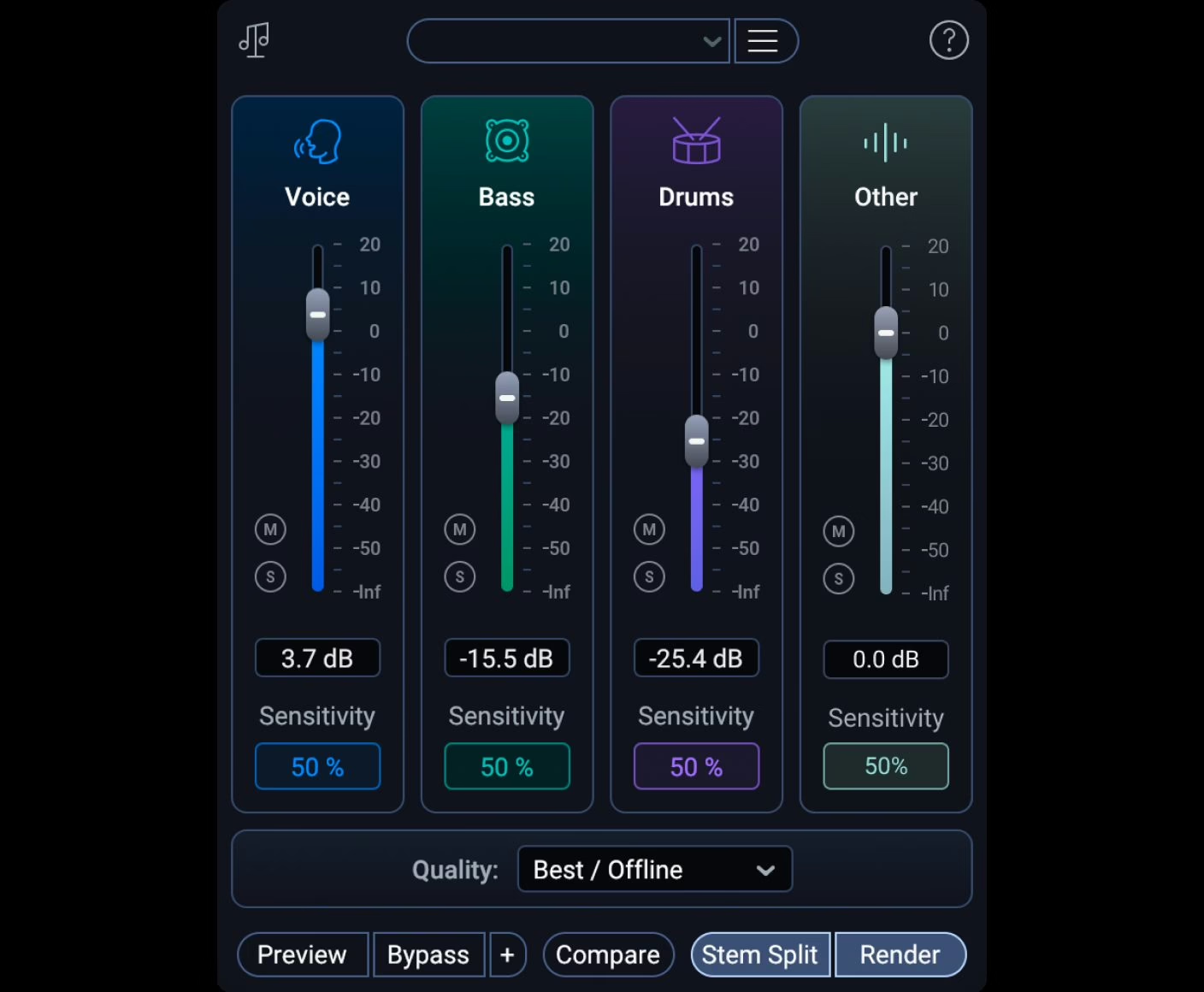
RX is the de facto standard for post-production and audio restoration, and its Music Rebalance module is the most direct equivalent to SpectraLayers’ separation. It analyses a stereo mix and breaks it into four stems — vocals, bass, percussion and the remaining instruments — which you can boost, cut or extract independently. The headline change in version 12 is that Music Rebalance now also runs as a real-time plugin, not just an offline process.
What makes the difference is the context: once separated, a track lands in the most complete spectral editor on the market, ready to hunt down a resonance, a click or a stray reverb tail. Note that iZotope left Native Instruments to join Boris FX this summer; existing licenses are honoured. Watch the edition split, though: Music Rebalance only appears from RX 12 Standard upward — the $99 Elements edition does not include it.
At a glance: iZotope (Boris FX) · paid, RX 12 Standard $399 / Advanced $1,399 (separation absent from Elements) · VST3, AU, AAX and ARA, macOS and Windows.
Hit’n’Mix RipX DAW / DAW PRO — separation down to the note
RipX tackles the problem from a more radical angle. After separating a track into six or more stems, it breaks each one into audio objects — the “rips” — where every note and harmonic becomes editable in pitch, volume, timing and timbre. You don’t just isolate the vocal: you can fix a wrong note inside an already-mixed recording, which stays out of reach for a classic separator.
The range has been streamlined: the old DeepRemix and DeepAudio modules gave way to two products, RipX DAW and RipX DAW PRO. PRO adds in-session integration via RipLink (ARA2, VST3, and AudioSuite on the Pro Tools side). In spirit, it is the closest thing to SpectraLayers’ “separate in order to rewrite” philosophy, with an object-based rather than purely spectral approach.
At a glance: Hit’n’Mix · paid, RipX DAW $99 / DAW PRO $198 · standalone and VST/VST3 host, ARA2/VST3/AudioSuite integration in PRO, macOS and Windows.

Acon Digital Remix — real-time separation on a budget
Remix is the clever pick of the bunch: a plugin that breaks a mix into five stems — vocals, piano, bass, drums and the rest — in real time, right on a track in your DAW. Each stem gets an independent sensitivity control and automatable parameters, so you can ride the separation across the song rather than commit to a frozen render.
Honestly, Remix doesn’t rival RX or SpectraLayers on fine spectral editing — that isn’t its job. But to extract or duck a source on the fly, inside the mix flow, for under fifty dollars, it does exactly the work. It is the kind of well-designed product that puts the competition’s pricing back into perspective.
At a glance: Acon Digital · paid, $49 (around €49.90 depending on region, non-promo price) · VST, VST3, AU, AAX, macOS and Windows.

Acon Digital Remix product page →
Family 2 — Free and open source: separation, and only separation
These two separate as well as — sometimes better than — some paid products, because they rely on the very same research models. The trade-off is clear and worth stating plainly: they hand you stem files, full stop. No spectral editing, no internal touch-up. You separate here, you edit elsewhere.
Ultimate Vocal Remover (UVR5) — the free Swiss army knife
UVR5 is the tool the community recommends first, and with good reason: free, open source (MIT license), available on Windows, macOS and Linux, it gathers the best separation models — MDX-Net, the VR architecture, and Demucs — into a single interface. You pick the model, the target (vocals, instrumental, drums, bass), and it exports the stems. Everything runs locally, with no upload and no account.
It is the best entry point for anyone who wants big-model quality without spending a cent. The only real limitation, beyond the lack of editing, is a slightly technical install and the machine power required: without a GPU, processing is slow. Nothing prohibitive for anyone used to a production computer.
At a glance: Anjok07 and contributors · free, open source (MIT) · standalone app, Windows, macOS and Linux.

Ultimate Vocal Remover official site →
Demucs — the engine behind many of the others
Demucs is the research model, authored by Alexandre Défossez (then at Meta AI), that quietly powers a good share of the consumer tools on this page. Its current version, Hybrid Transformer Demucs, separates into four stems (vocals, drums, bass, other), and a six-stem variant adds guitar and piano. Separation quality is among the best available, free and under an MIT license.
Let’s be clear about scope: Demucs is a developer’s tool, driven from the command line via Python. No interface, no comfort. If typing a command puts you off, go through UVR5, which bundles it cleanly. But for batch processing or pipeline integration, direct access to the engine is unbeatable. Worth noting: the reference repository is no longer actively developed.
At a glance: Alexandre Défossez / Meta AI · free, open source (MIT) · Python command line, macOS, Windows and Linux, GPU acceleration.

Family 3 — One click away: built into the DAW or online
Here, separation happens in a single click, right where you already work. Comfort is maximal, control minimal: you get decent stems, with no fine-tuning and no spectral editing. Three of them also go through the cloud, which assumes a connection and, often, an account. For a quick fix or a fast creative idea, that is more than enough.
FL Studio — separation built into the DAW
Image-Line has built stem separation straight into FL Studio: select some audio, and the software automatically splits it into vocals, drums, bass and instruments. Processing runs through the cloud, which speeds it up thanks to large server-side models but requires a connection. The feature is available from the Producer edition upward, not in Fruity.
For a producer already on FL Studio — whose 2026 edition has just landed — it is the shortest path from a track to its stems, without leaving the project. Don’t look here for the finesse of a spectral editor: this is an extraction command, not a restoration workshop.
At a glance: Image-Line · paid, separation included from FL Studio Producer $179 (lifetime free updates) · macOS and Windows, online processing.

Logic Pro Stem Splitter — the native option for Apple Silicon Macs
Since Logic Pro 11, Apple has built in Stem Splitter, and the 11.2 update pushed it to six stems: vocals, drums, bass, guitar, piano and the rest. A control-click on an audio region, and Logic creates a track stack with each stem on its own sub-track. It is smooth, clean, and entirely free once you own Logic.
Two sizeable caveats: the feature demands an Apple Silicon Mac (M1 or newer), and it lives exclusively inside the Apple ecosystem. No separation control, and no spectral editing either — but for a Logic user, it is the most immediate tool there is, at no extra cost.
At a glance: Apple · included in Logic Pro (Mac $199.99 one-time; iPad on subscription) · macOS, Apple Silicon Mac M1 or newer required.

Apple Logic Pro product page →
Moises — separation in the browser and on the phone
Moises is the most accessible of the lot: an online service, backed by iOS and Android apps, that separates any uploaded track into stems, with chord detection and tempo or key changing thrown in. It is the tool for the musician who wants to rehearse over a version without vocals, or isolate a line to push it back — without installing anything.
The model is freemium: a free tier capped at a few tracks per month and basic separation, then subscriptions to lift the limits and unlock more stems. Exact pricing depends on region and platform — expect roughly $4 to $10 per month for the paid plans, to confirm on your account. Everything goes through the cloud: upload required, no spectral editing, dependence on the service.
At a glance: Moises (Music.AI) · freemium, limited free tier then subscription (around $4 to $10/month depending on plan, to confirm) · web, iOS and Android.

The recap
| Tool | Maker | Price | The job in a word |
|---|---|---|---|
| iZotope RX 12 | iZotope (Boris FX) | $399–1,399 | Restore |
| Hit’n’Mix RipX | Hit’n’Mix | $99–198 | Rewrite |
| Acon Digital Remix | Acon Digital | $49 | Real-time unmix |
| Ultimate Vocal Remover | Anjok07 & comm. | Free | Isolate |
| Demucs | A. Défossez / Meta | Free | The engine |
| FL Studio | Image-Line | from $179 | Extract in the DAW |
| Logic Pro Stem Splitter | Apple | included ($199.99) | Split on Mac |
| Moises | Moises (Music.AI) | Freemium | Quick online fix |
Which one should you pick?
It all depends on what you’ll do with the result. If separation is merely a gateway to real restoration or rewriting work, stay in the first family: RX 12 for repair and mastering, RipX to fix down to the note, Acon Remix if you want the essentials of real-time unmixing without blowing the budget. That is where, like SpectraLayers 13, you separate in order to retouch.
If you’re after the best possible separation at zero cost and the editing will happen elsewhere, UVR5 is the obvious choice, with Demucs for anyone unafraid of the command line. And if convenience comes first — a fast fix, without leaving your environment — use what you already have: FL Studio or Logic for those who work in them, Moises for the browser and the phone. It’s also worth remembering that separation now arrives in real time inside the mix itself, as Waves StudioVerse Mix Unlock shows.
My advice, shaped by years of judging on the sonic result rather than the spec sheet: start by testing UVR5, free, to calibrate your expectations on your own files. You’ll then know whether separation alone is enough — or whether your work demands the full workshop of an RX or a SpectraLayers.