Eventide is bringing back Music Mouse, the software instrument conceived in 1986 by composer and computer music pioneer Laurie Spiegel. More than a simple vintage plug-in, it is a genuine piece of computer-assisted music history now appearing in our DAWs, with a clear promise: to generate rich harmonies in real time from simple mouse movements.
What Music Mouse actually does, beyond the retro factor
In 1986, most music software were just sequencers or editors. Music Mouse was something else: a live-playable algorithmic instrument. The basic concept remains the same in the Eventide version:
- You define a musical grid: scales, available notes, possible chords, arpeggio patterns.
- You configure the behaviour of the algorithm: up to four voices, cursor following, melodic and harmonic behaviour.
- By moving the mouse within this grid, the software generates notes, chords and arpeggios in real time, staying within the tonal or modal framework you have set.
In practice, Music Mouse acts like an intelligent harmonic assistant: it prevents you from playing “wrong” notes relative to the chosen configuration and offers coherent melodic pathways. Whereas a classic arpeggiator follows a fixed logic (up, down, random, etc.), Music Mouse offers continuous interaction with your gesture, almost like a giant ribbon controller but driven by a musical algorithm.
Why this old concept is still ahead of many current plug-ins
Many modern composition-aid tools (Captain Plugins, Scaler, Orb, etc.) rely on progression libraries and presets. Music Mouse belongs to another tradition: that of minimalist generative instruments, centred on a gesture rather than on drop-down menus.
As Eventide puts it: “Music Mouse was fun and playful, enabling people to make music in a radically new way.” Tony Agnello, Eventide’s first engineer, particularly stresses the break with the effects/sound-design-led approach dominant in the 80s: Spiegel envisioned the computer as an intelligent musical tool, ‘trained’ to accompany and enrich a performance, not just as a sound generator.
For today’s musicians used to DAWs, Music Mouse is closer to:
- an expressive instrument like LinnStrument, ROLI or Haken, but driven by a mouse;
- a generative sequencer controlled live, rather than programmed bar by bar;
- an improv partner capable of accompanying a performance on keyboard, MIDI guitar or another controller.
When Music Mouse becomes a genuinely creative tool
1. Finding harmonic ideas when you “hear” more than you can read in theory
If you have a good ear but are not comfortable with inversions, modes or chord extensions, Music Mouse can serve as an interactive harmonic calculator. By locking in the scale and a few parameters, each movement becomes a possible path through the chosen harmony. You quickly get:
- chord progressions that step outside the usual I–V–vi–IV patterns;
- easily explored modal textures (Dorian, Lydian, etc.);
- coherent melodic lines without going through the piano roll.
Compared to plug-ins that “suggest” chords via buttons, Music Mouse demands a degree of gestural involvement: you don’t click on “next chord”, you play the journey.
2. Improvising live with a virtual instrument that is genuinely playable with a mouse
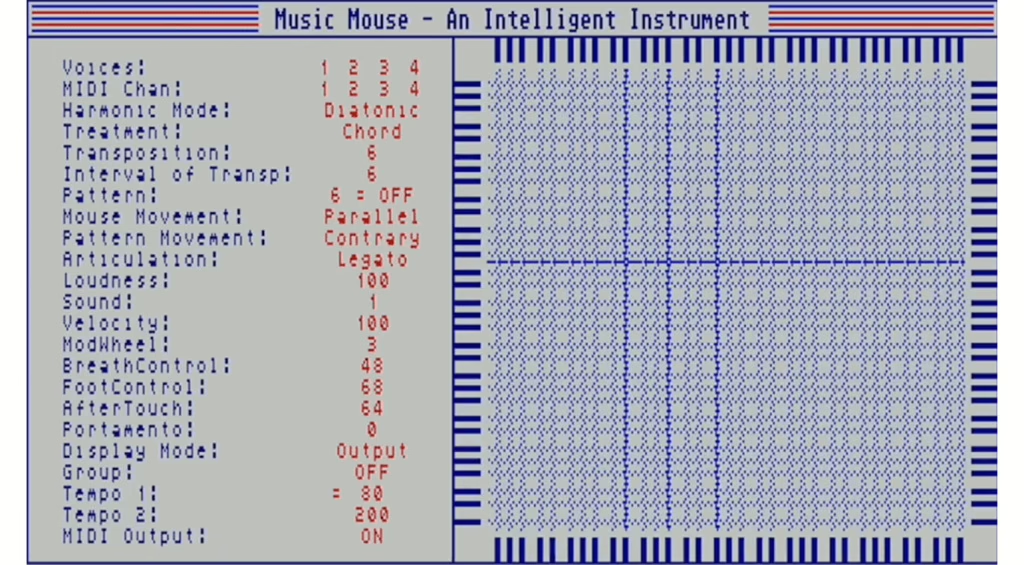
Historically, Music Mouse was already a live instrument on Atari, Amiga and Mac. The Eventide edition keeps that philosophy: in stand-alone mode or in a DAW, you can:
- play live on the grid while another musician handles the rhythm section;
- improvise a solo or harmonic pad in sync with an external MIDI clock;
- send generated patterns to hardware or software synths via MIDI.
It’s very different from a classic timeline: here, your micro-movements sculpt the music. The risk, of course, is that “everything starts to sound the same”, but used well, Music Mouse can become an additional voice in a live set, on a par with a lead synth or a loop controller.
3. Sequencing hardware synths differently
Back in the day, Music Mouse already sent MIDI to external machines. Today, with the new version, it once again offers the ability to drive hardware synths in a non-linear fashion. A typical example: a session where Music Mouse sequences two Akemie’s Castle modules via a Commodore Amiga 2000 – proof that its algorithmic engine is perfectly suited to complex FM timbres and evolving textures.
Hooked up in a modern rig, you might imagine:
- an analogue machine handling the bass, driven by one of Music Mouse’s voices;
- an FM module for higher-pitched textures on another voice;
- a polyphonic VST receiving the whole lot for dense harmonic pads.
Unlike a Euclidean sequencer or a simple randomiser, Music Mouse remains constrained by the defined musical grid: the chaos is always framed by harmonic logic.
4. Working with generative music and narrative sound design
For film, ambient or sound installation composers, Music Mouse acts as a controllable generative engine. You can:
- let a patch run in a loop, slowly changing the mouse position or the grid parameters;
- record long MIDI takes to edit later in the DAW;
- use the algorithm as a basis for textures to be resampled, time-stretched, granulated, etc.
Where many modern “generative” tools feel like pre-fabricated music, Music Mouse is deliberately minimal: it produces nothing unless you interact with it. That is both its strength and its limitation – an advantage if you want a co-creation tool, not an automatic composer.
What the Eventide reissue changes compared with the original
Eventide describes it as a reissue done “with care”: no feature overload, but targeted updates for modern workflows.
Modernised yet faithful interface
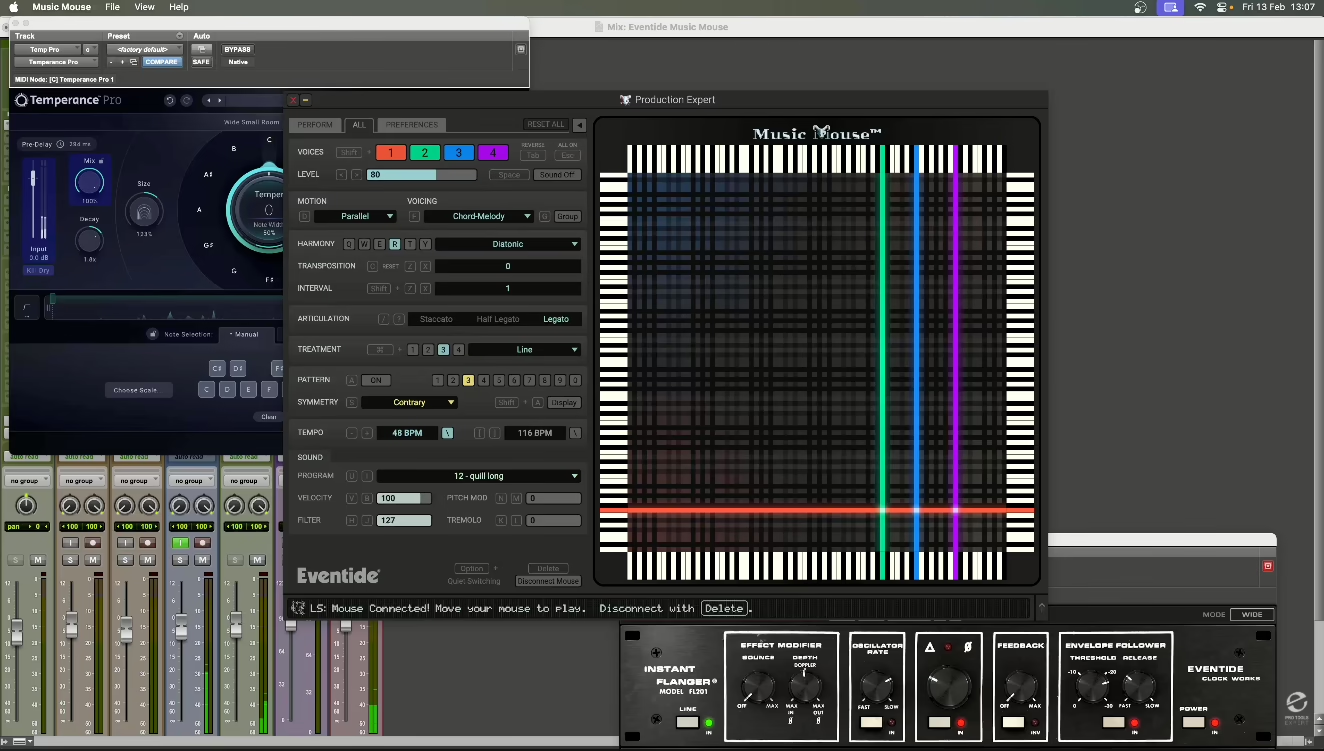
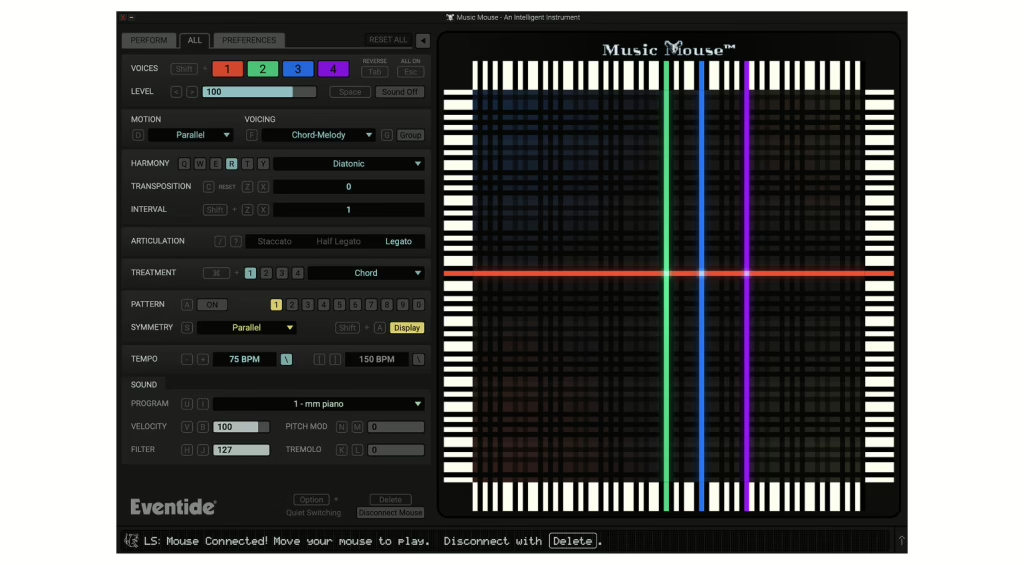
The new version keeps Music Mouse’s iconic grid and its four keyboard charts with coloured lines indicating played notes. The improvements mainly concern:
- an updated GUI for current displays;
- a scalable interface (resizable), essential for multi-screen setups;
- clearer visual feedback around the polyphonic cursor;
- optional help and a hint bar to ease the learning curve;
- a right-handed / left-handed layout, a small ergonomic detail but very welcome.
Compared to the original, you gain readability and comfort without losing the minimalist aesthetic that is part of the software’s DNA.

DAW integration and MIDI sync
The main change for today’s musicians: Music Mouse now exists both as stand-alone software and as a plug-in in your DAW. It can:
- lock to the tempo of a DAW, hardware device or notation software;
- follow an external MIDI clock;
- record its MIDI outputs directly into a track in your project.
That puts it in the same practical category as advanced arpeggiation or composition-assistant plug-ins, but with the DNA of a real-time instrument born in the 80s.
A Spiegel-flavoured sound: FM-inspired presets
Another interesting addition: Music Mouse now includes expanded sound presets derived from Laurie Spiegel’s original DX7 and TX7 patches. This means that, even without connecting an external synth, you can access a FM palette characteristic of that era’s aesthetic, ideal for:
- testing the instrument without worrying about MIDI routing;
- sketching complete pieces in a simple stand-alone environment;
- capturing the sonic character of a slice of 80s electronic music, with a completely different way of playing.
What you need to know before buying: strengths, limitations, positioning
The real strengths
- Unique concept: very few current plug-ins offer such a radically gestural approach to harmony.
- Historic instrument: it is a piece of computer music heritage, not just a trendy emulation.
- Affordable price: $29, with a loyalty price announced at $19 for existing Eventide customers (via email).
- Hybrid use: stand-alone, plug-in, internal/external MIDI, clock sync – it slots easily into a professional setup.
- Ideal for breaking habits: perfect for escaping deeply ingrained piano or guitar reflexes.
The limitations to accept
- Conceptual learning curve: this is not “just another plug-in” but a different way of thinking about composition.
- Not an auto-arranger: it does not “compose” for you, it amplifies your gestures and choices.
- Potentially recognisable aesthetic: without at least some parameter tweaking, you may quickly recognise the “Music Mouse stamp” across several tracks.
Compared with today’s all-in-one solutions, Music Mouse is almost counter-trend: few features, but a strong musical idea. That is precisely what makes it interesting for already well-equipped professionals, rather than as an entry-level product.
Price, availability and release context
Eventide’s version of Music Mouse is available now for Mac and Windows, at a street price of around $29. Existing Eventide customers can benefit from a $19 loyalty price, communicated via email.
The fact that Eventide, known mainly for its high-end hardware effect emulations, has devoted time to reviving such a singular piece of software shows that this is clearly a labour of love rather than just a catalogue move. For curious musicians, it is an opportunity to put the mouse back at the heart of the instrument – and to rediscover how, as early as 1986, some had already realised that the computer could be a playing partner, not just a glorified tape recorder.
FAQ: understanding Music Mouse properly before you pay
Can Music Mouse replace a sequencer or a composition-aid plug-in?
No, it does not replace a full sequencer or an automatic arranger. Music Mouse is a real-time generative instrument that complements your DAW: it is excellent for finding ideas, improvising and generating original MIDI, but it does not offer the structured editing of a sequencer or the ready-made progression banks of “chord helper” plug-ins.
Do I need music theory knowledge to get something out of it?
Not necessarily, though it helps. The whole point of Music Mouse is precisely to protect you from wrong notes by keeping you inside the defined grid and scale. Even with limited theory, you can improvise coherent lines. However, if you are already comfortable with modes, inversions and tensions, you will get much more out of the grid logic and the harmonic richness it can produce.
Is it still relevant if I already have plug-ins like Scaler, Captain Chords, etc.?
Yes, but for a different role. Those plug-ins are excellent for documenting and organising harmony (progressions, presets, analysis). Music Mouse is more about playing harmony in a fluid, gestural way. If you are looking for a chord library, this is not the tool. If you want a way to break your automatisms and “draw” music in real time, that is exactly what it is for.
Is it suitable for professional use in the studio or on stage?
Yes. In the studio, it can generate editable MIDI tracks for your internal or external synths, synced to your project. On stage, as stand-alone or plug-in, it can function as an additional instrument controlled via mouse or trackpad, synchronised to a MIDI clock. Its stability will mainly depend on your computer and DAW environment, but conceptually it is perfectly suited to professional use.