Manuel de référence QL5/QL1
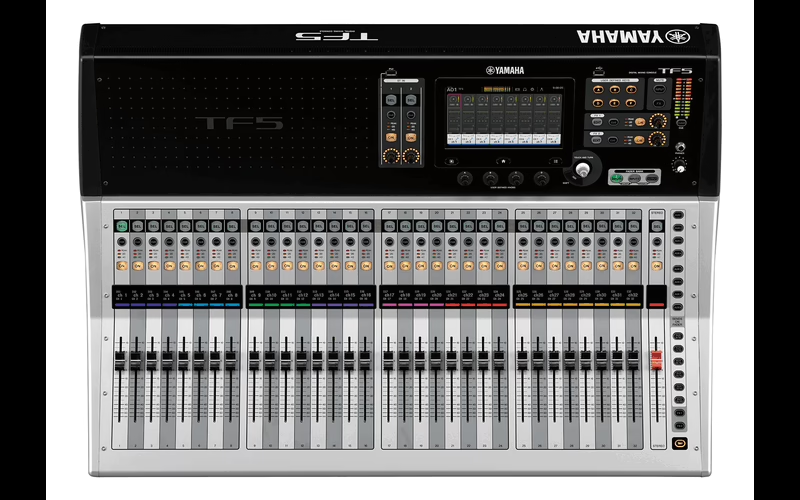
Console : Yamaha QL5
Sommaire
- How to Use This Reference Manual1
- Contents2
- Function Tree4
- SELECTED CHANNEL section6
- Operations in the SELECTED CHANNEL section6
- Channel Strip section12
- Operations in the Channel Strip section12
- Input and output patching16
- Changing the input patch settings17
- Changing the output patch settings18
- Inserting an external device into a channel20
- Directly outputting an INPUT channel22
- Input channels25
- Signal flow for input channels25
- Specifying the channel name, icon, and channel color26
- Making HA (Head Amp) settings28
- Sending the signal from an input channel to the STEREO/MONO bus33
- Added pan function (Monaural input channels only)35
- Sending a signal from an input channel to a MIX/ MATRIX bus38
- Channel name display indication41
- Correcting delay between channels (Input Delay)41
- Surround output for input channels44
- Channel library operations48
- OUTPUT channels49
- Signal flow for output channels49
- Specifying the channel name, icon, and channel color50
- Sending signals from MIX channels to the STEREO/ MONO bus51
- Sending signals from MIX channels and STEREO/ MONO channels to MATRIX buses53
- Correcting delay between channels (Output Delay)55
- Using the PORT TO PORT function56
- Channel library operations57
- EQ and Dynamics58
- Using EQ58
- Using dynamics61
- Using the EQ or Dynamics libraries64
- Channel Job65
- DCA group65
- Mute group67
- Using the Recall Safe function70
- Channel Link function74
- Copying, moving, or initializing a channel78
- About Mix Minus82
- Scene memory83
- Storing and recalling scenes84
- Editing scene memories88
- Using the Global Paste function90
- Using the Focus Recall function93
- Using the Fade function95
- Outputting a control signal to an external device in tandem with scene recall (GPI OUT)96
- Playing back an audio file that links to a scene recall97
- Using Preview mode99
- Monitor and Cue functions100
- Using the Monitor function101
- Using the Cue function107
- Talkback and Oscillator115
- Using Talkback115
- Using the Oscillator function117
- Meters120
- Operations in the METER screen120
- Graphic EQ, Parametric EQ, effects, and Premium Rack125
- About the virtual rack125
- Virtual rack operations126
- Graphic EQ operations129
- About AUTOMIXER136
- Editing the internal effects138
- Effects and tempo synchronization145
- Using the Premium Rack146
- Using the graphic EQ, parametric EQ, effect, and Premium Rack libraries157
- I/O devices and external head amps158
- Using an I/O device158
- Remotely controlling an R series unit161
- Third-party equipment’s HA control function165
- Remotely controlling an amp167
- Remotely controlling WIRELESS unit167
- Using an external head amp170
- Remotely controlling an external head amp172
- Controlling an internal head amp174
- MIDI175
- MIDI functionality on the QL series console175
- Basic MIDI settings175
- Using program changes to recall scenes and library items178
- Using control changes to control parameters180
- Using parameter changes to control parameters182
- Recorder183
- About the USB memory recorder183
- Assigning channels to the input/output of the recorder183
- Recording audio to a USB flash drive185
- Playing back audio files from a USB flash drive187
- Editing the title list188
- Recording or playing back using a computer DAW189
- Using the QL console with Nuendo Live192
- Setup196
- About the SETUP screen196
- User settings199
- Preferences206
- USER DEFINED keys208
- Functions that can be assigned to USER DEFINED keys209
- USER DEFINED knobs214
- Functions that can be assigned to USER DEFINED knobs215
- Custom fader bank216
- Console Lock218
- Saving and loading setup data to and from a USB flash drive219
- Remount function to USB flash drives226
- Word clock and slot settings226
- Using cascade connections228
- Basic settings for MIX buses and MATRIX buses232
- Switching the entire phantom power supply on/ off233
- Specifying the brightness of the touch screen, LEDs, channel name displays, and lamps233
- Setting the date and time of the internal clock234
- Setting the network address234
- Setting up the Dante audio network235
- Using GPI (General Purpose Interface)246
- Help function251
- Loading a Help/text file from a USB flash drive251
- Viewing Help251
- Using USER DEFINED keys to recall Help directly252
- Other functions253
- Initializing the unit to factory default settings253
- Adjusting the detection point of the touch screen (Calibration function)253
- Adjusting the faders (Calibration function)254