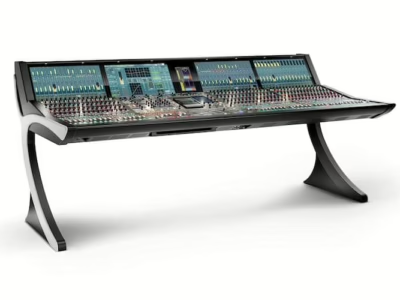
zirkon / zirkonXL / VisTool — Manuel d'exploitation (R2.7)
Console : Lawo zirkon
Sommaire
- Operator's Manual1
- Table of Contents
- About This Manual7
- How To Use This Manual7
- Conventions7
- Topics7
- Marginal notes7
- Action Keys7
- Chapter 1: Operating Philosophy9
- Welcome9
- Control Surface Overview9
- System Overview11
- Core Hardware11
- Options13
- Nova1715
- Signal Flow17
- Sources17
- Source Parameters17
- Summing Busses19
- The Power of Configuration21
- Integrated Digital Routing Matrix21
- System Networking23
- Macros25
- Radio Automation25
- Snapshots and Memories27
- What’s Stored in a Snapshot and Memory?27
- External Memory Cards27
- PC Snapshot Storage29
- Transferring Snapshots to a Different Console29
- Source Parameters29
- Analogue and Digital Input Sections29
- Metering33
- Delay33
- Equalisation and Filters33
- Gate, Expander and Compressor35
- Limiter35
- Insert Send/Return37
- Direct Outs37
- Monitoring37
- PFL (Pre Fade Listen)39
- Buttons and Controls41
- Multi-function Keys (MF Keys)41
- Self-labelling LCD Buttons41
- Rotary Controls41
- Quick Reference Guide43
- Channel Module43
- Central Module43
- Central Module XL45
- Chapter 2: Getting Started47
- Switching on the Power47
- Resetting the Console47
- Monitoring a Signal49
- Input/Source Attributes49
- Source Label49
- Assigning Sources to Fader Strips49
- Signal Present51
- Fader53
- Fader Start53
- Input Gain53
- Aux Send Level55
- Bus Assign55
- Monitoring59
- PFL (Pre Fade Listen)59
- Trouble Shooting59
- Applying Signal Processing61
- Conference Busses – Mix Minus/N-165
- Configuration Requirements65
- Operation67
- Saving and Recalling Settings67
- Chapter 3:Control Surface Operation73
- Introduction73
- The Channel Module73
- Access Key75
- MF Keys 1 to 477
- Fader Scale77
- Virtual Fader Strips77
- The zirkon Central Module79
- LCD Buttons and Rotary Controls79
- Top Level Functions79
- Sub Menus81
- The Gain menu83
- The EQ menu87
- The Dynamics menu89
- The Limiter/Insert menu91
- The Delay menu91
- Snapshots, Memories and PFL Modes93
- MF (Multi-Function) Keys99
- The zirkonXL Central Module99
- Source Parameter Controls101
- Global Controls115
- MF (Multi-Function) Keys119
- Monitor 1, 2 and 3 Level Controls119
- Assignable Rotary Controls119
- Optional Key Panels119
- 2s Control Surface Modules121
- The Channel Module 2s123
- The Monitoring Module 2s123
- Chapter 4: Vistool Operation125
- Overview125
- Software Versions and Licensing125
- Vistool: Getting Started127
- Starting the Application127
- Changing Views & Exiting the Application129
- The Clock & Page Title131
- Page Navigation131
- Vistool: OnAir, Technic and RT133
- Vistool: Common Elements135
- Signal Buttons135
- Metering (PPMs)137
- Timers141
- Channel Status Information (Sourcestate)145
- Access’ Source Information147
- Vistool RT: Application Examples147
- Matrix Control147
- Assigning Sources to Fader Strips151
- Source Parameter Control (PARM)151
- Snapshot Management (PC Snapshots)153
- Glossary155
- Index Directory161